Free · No account needed
Google Review Card Maker
A small card for the counter or the receipt: the invitation and the QR on the front, the steps on the back. A PDF at card size, with an optional NFC chip customers can tap. Switch to the thank you for your order card for the parcel insert of an Etsy or Shopify shop.
Free forever. Your codes never expire.In Google Business Profile: Read reviews, then Get more reviews, then Copy.
Printed on both sides of the card.
Free static QR. No watermark, no scan limit, and no expiry set by Scanely. The destination must remain available.
Your QR code
Generated in your browser. Scanely does not upload your link to generate this static QR.
Ready for your counter
Front and back, as one print-ready PDF.
Fill in both sides and download a PDF at the exact card size. No account or watermark.
The front then says "Tap or scan". You write the link to the chip yourself with an NFC app; see the guide below.
Add a valid review link above to prepare your card.
Print at 100% / actual size: page 1 is the front, page 2 the back. Test one card before printing a batch. Cards are individual pages; ask your printer to arrange them on a sheet.
Front
Review us on Google
Tell us about your experience.
Back
Thank you for visiting
- 1. Scan the code or tap the card
- 2. Sign in to Google
- 3. Rate your visit and write a few words
Content preview. Your PDF uses the Business card · 85 × 55 mm format.
Keep the print. Change the link.
Create an account to make an editable QR and see scan counts. Your link, colors, and size will be ready in the creator.
A dynamic QR is a new code. Create and download it before printing; this static download will not become trackable.
What a Google review card is
A Google review card is a business card you hand over with the receipt or leave at the counter. The front carries a short invitation and a QR code that opens your Google review form. The back tells the customer what happens next in three lines. Some cards also carry an NFC chip, so a phone held against the card opens the same link without scanning.
This page makes the file. Scanely does not sell printed or NFC cards: you print the PDF at home or at a print shop, and you buy blank NFC cards or stickers from any supplier.
Front and back
Choose 85 × 55 mm, the business card size used across Europe, or 3.5 × 2 inches for the US. The PDF has two pages at that exact size: page 1 is the front, page 2 the back. Print shops print it double-sided; at home, print page 1, turn the sheet and print page 2. Keep the QR’s empty border, print at 100% and scan one physical card before you print a batch.
The invitation, the supporting line, the heading on the back and the three steps are all editable. A neutral wording such as “Tell us about your experience” works for every customer.
Thank you for your order: the card for Etsy and Shopify parcels
The same two-sided card works as the insert in a parcel: "Thank you for your order" and the QR on the front, three lines on the back that say where to leave the review. Choose Thank you for your order above the link field and paste the page customers open, your Etsy shop reviews page, your Shopify store or product page, a Trustpilot, Facebook or Google review link; a neutral wording with no reward and no request for a particular rating keeps you inside every marketplace's rules. Amazon lets sellers ask for reviews only through its own Request a Review tool, so check its rules before printing an Amazon link. The 85 × 55 mm card fits every envelope and box; a survey QR code on the same card asks about the delivery instead of the product. Scanely sees no orders and no reviews; the card only carries the link.
Add NFC: tap or scan
- Buy a blank NFC card or sticker that supports an NDEF URL record. Ask the supplier to confirm the chip type and that the tags arrive unlocked.
- Open an NFC writing app on your phone, read the tag first, then write the same Google review link as a URL record. Wakdev’s NFC Tools is one option for iPhone and Android; it is a separate product from Scanely.
- Hold a phone against the card and check that the review form opens. Then tick “The card also has an NFC chip” above, so the front says “Tap or scan”.
The NFC setup guide covers writable tags, locking and troubleshooting. The NFC Google review card guide explains what to check before buying a batch of cards.
Where to print
A home printer on 250 to 300 gsm matte card stock is enough for a first run. A local print shop or an online printer accepts the PDF as it is; ask for no scaling and for the cards to be arranged on a sheet. Longer review links make denser codes, so if a small card fails the print check, use the review link from Google Business Profile rather than a long Maps URL.
Keep the link editable
The free card contains a static QR, which always opens the same link. If you later move to another location or want to see how often the card is scanned, create a dynamic QR in your Scanely account first and print that one. Its destination stays editable after printing, and it counts scans. A scan is not a review: Scanely does not read your Google reviews. The Free plan includes three dynamic codes.
Ask for honest reviews
Invite every customer, without rewards or a request for a particular rating. Google’s review guidance explains the account requirement and why incentives are not allowed.
Need the QR alone, or a sign for the counter? Use the Google review QR generator or the QR print templates. Finding the right link is covered in the Google review link guide, and the reviews kit brings cards, editable review pages and placements together. You can also check the QR in your downloaded image. For a longer questionnaire instead of a public review, the survey QR code generator prints the same card and table stand for a Google Form or SurveyMonkey link.
Scanely is independent of Google. Generating a card does not verify a Business Profile or guarantee reviews.
Check the scan before your print run
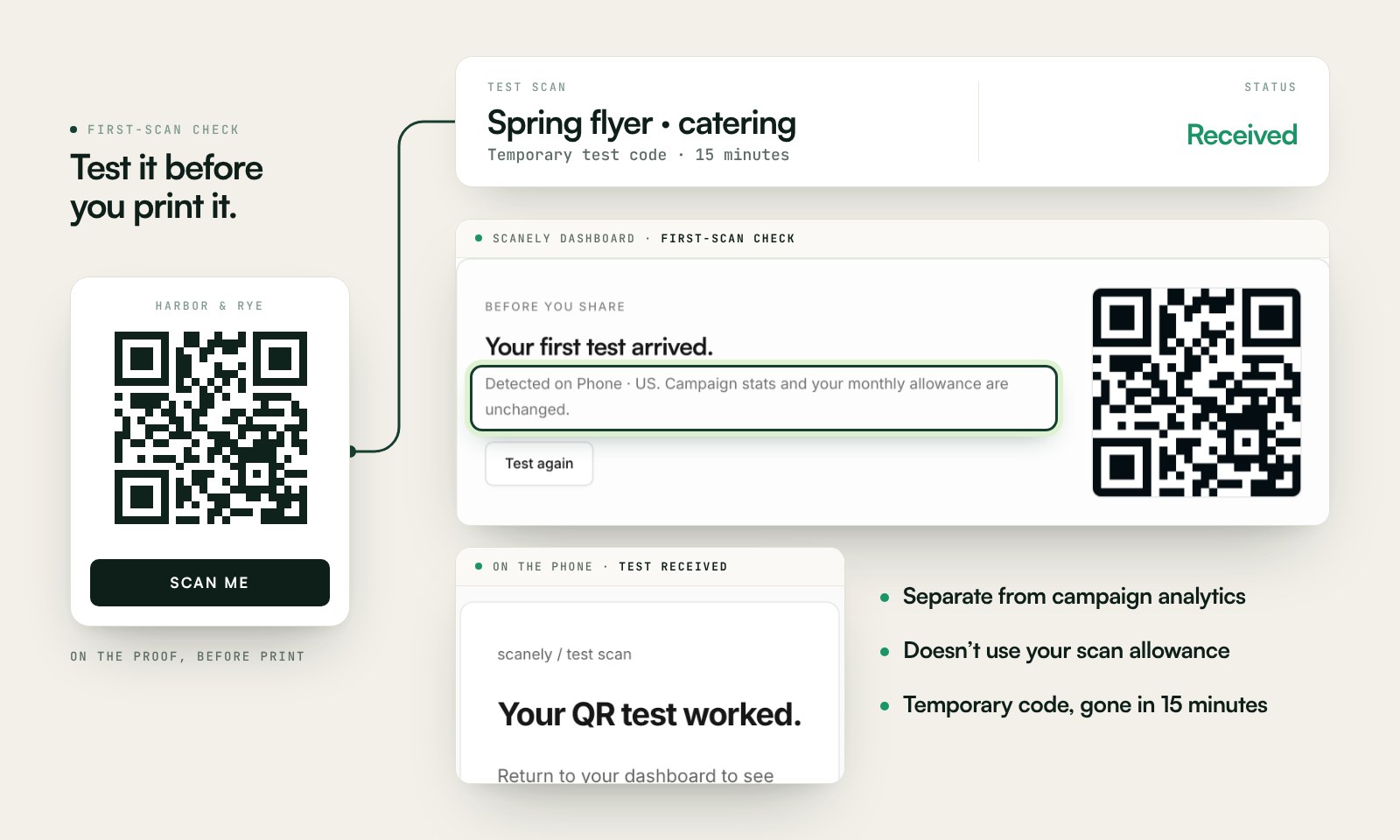
Scan a printed proof of your static download with a phone and check its destination. If you create a dynamic code in your Scanely account, First-scan check gives you a temporary test QR and confirms when your phone scans it.
The temporary code keeps test activity separate from campaign analytics. Never print it; download and test the final QR before ordering a batch.
Questions before you print
Is the Google review card free?
Yes. Download the two-sided card PDF at card size and the QR as PNG or SVG. No account, watermark, or Scanely scan limit.
Does Scanely sell printed cards or NFC cards?
No. Scanely does not sell printed or NFC cards. It gives you the print file and the instructions. Paper and printing come from your printer or a print shop, blank NFC cards or stickers from any supplier.
Which card sizes are available?
85 × 55 mm (the business card used in Europe) and 3.5 × 2 inches (the US business card). Each side is its own PDF page; a print shop arranges the cards on a sheet.
How do I add NFC to the card?
Buy a blank NFC card or sticker that supports an NDEF URL record and write the same review link to it with an NFC app on your phone. Then tick "The card also has an NFC chip" so the front says "Tap or scan".
Can I change the link after printing?
A static QR always contains the same link. To change the destination later, create a dynamic QR in your Scanely account before printing and print that one instead.
Does the card count reviews?
No. The static QR counts nothing. A dynamic Scanely QR can count scans, but a scan is not a posted review. Scanely does not read your Google reviews.
Do customers need a Google account?
Yes. To leave a Google review, the customer must be signed in to a Google account. The QR or NFC chip does not change that.
Can I make a thank you for your order card for Etsy or Shopify?
Yes. Choose "Thank you for your order" above the link field: the front says thank you with the QR, the back explains how to leave a review. Paste the public link customers open: your Etsy shop reviews page, your Shopify store or product page, a Trustpilot, Facebook or Google review link. Amazon lets sellers ask for reviews only through its own Request a Review tool; check its rules before printing an Amazon link. Tuck the card into the parcel. Scanely sees no orders and no reviews.