Free · No account needed
Survey QR Code Generator
Paste the link of your survey or feedback form and get a QR code with a sign for the counter, a table card, a receipt sticker and a poster. Customers, guests and staff answer on their phone while the visit is fresh, with no app and no typing of a link.
Free forever. Your codes never expire.The public link respondents open: Google Forms, Microsoft Forms, SurveyMonkey, Typeform, Jotform, Tally, Qualtrics or a form on your site.
Printed on the sign, the stand and the card.
Free static QR. No watermark, no scan limit, and no expiry set by Scanely. The destination must remain available.
Your QR code
Generated in your browser. Scanely does not upload your link to generate this static QR.
Ready for your counter
Make it a print-ready card or sign.
Add a short invitation and download a PDF at its exact print size. No account or watermark.
Add a valid link above to prepare your print.
Print at 100% / actual size. Keep the QR border clear and test one physical sample before printing a batch. Cards are individual pages; ask your printer to arrange them on a sheet.
Tell us how we did
Scan to answer a two-minute survey.
Content preview. Your PDF uses the selected 8.5 × 11 in · fold into thirds layout, including fold lines.
No survey tool yet?
A quick feedback page with one question and a message box.
The Quick feedback template in your Scanely account is a one-screen page: a thank-you line, an optional public review link and a private message form. Each reply lands in Leads and in your email. It is not a survey builder: for ratings, multiple questions and charts, link a survey tool above.
- The Free plan includes three dynamic codes and ten form replies a month; Starter is $9 per month for 50 codes.
- A dynamic code can be pointed at the next survey after the signs are printed, and counts scans per placement.
- Scanely never sees an answer: a scan is a scan, the responses stay in your survey tool or your Leads.
What a scan shows
Sample content: the Quick feedback template. Dashboard > Pages > New page > Reviews & feedback.
Keep the print. Change the link.
Create an account to make an editable QR and see scan counts. Your link, colors, and size will be ready in the creator.
A dynamic QR is a new code. Create and download it before printing; this static download will not become trackable.
What a survey QR code is
A survey QR code opens your survey when someone points a phone camera at it. The survey is the one your tool already hosts: a Google Form, a Microsoft Form, a SurveyMonkey collector, a Typeform, a Jotform. The code only carries that link. Put it on the counter for the customer who is still smiling, on the table for the guest waiting for the bill, on the receipt for the one who left, and on the break-room board for the staff survey nobody opens by email. People answer while the experience is fresh, which is when answers are honest.
This page makes the files. Scanely is not a survey tool and does not print signs: the answers land in the tool you link, and you print the PDF at the office or at a print shop.
Where to find your survey link
Paste the link respondents use, not the one in your browser while you edit. Scanely refuses the editor and results links it knows, because a scanned editor link shows the respondent a login screen.
- Google Forms: open the form, choose Send, then the link icon; the short forms.gle link is fine. A docs.google.com link ending in /edit is the editor.
- Microsoft Forms: choose Collect responses and copy the link; it starts with forms.office.com, forms.microsoft.com or forms.cloud.microsoft. DesignPage and AnalysisPage links are yours alone.
- SurveyMonkey: under Collect responses add a Web link collector and copy it; it looks like surveymonkey.com/r/ABC123. Create, Summary and Analyze are the back office.
- Typeform: choose Share and copy the link; it looks like yourname.typeform.com/to/abc123. admin.typeform.com is the editor.
- Jotform: choose Publish and copy the link; it looks like form.jotform.com/123456. Build and Submissions are yours alone.
- Tally, Qualtrics, Zoho Forms, Formstack, Cognito Forms: copy the share link from the publish step; Qualtrics anonymous links contain /jfe/form.
Any public https link is accepted, including a form on your own website.
Counter, table, receipt, board
The print kit above prints the code with a short call to action at its exact size: a folded table stand for the counter or the table, a US Letter sign for the lobby, the exit or the break room, an A6 flyer for the tray, a 70 × 70 mm sticker for the receipt or the window, and a card to hand over with the bill. "Tell us how we did" and "Scan to answer a two-minute survey" are starting points; say how long the survey takes and what you do with the answers, and more people scan. Print at 100%, keep the empty border and scan one printed copy before a batch.
One code, several surveys
The free code is static: it contains the link itself, so a stand printed for the spring survey keeps opening the spring survey. If you ask a new question each season, or want to know whether the counter or the receipt brings the answers, create a dynamic QR in your Scanely account first and print that one. Its destination stays editable after printing, and it counts scans per placement; a scan is not a response, and Scanely has no access to your survey tool. The Free plan includes three dynamic codes; Starter is $9 per month for 50 codes.
Only need a code for Google Forms? The Google Forms QR generator checks that specific link. For public reviews instead of a private survey, the Google review QR generator and the Google review card open the review form. The QR print templates cover more sign sizes, and you can check the QR in your downloaded image before printing.
Scanely is independent of Google, Microsoft, SurveyMonkey, Typeform, Jotform, Tally, Qualtrics, Zoho, Formstack and Cognito Forms. Their names are trademarks of their owners. Generating a code does not verify a survey or guarantee responses.
Check the scan before your print run
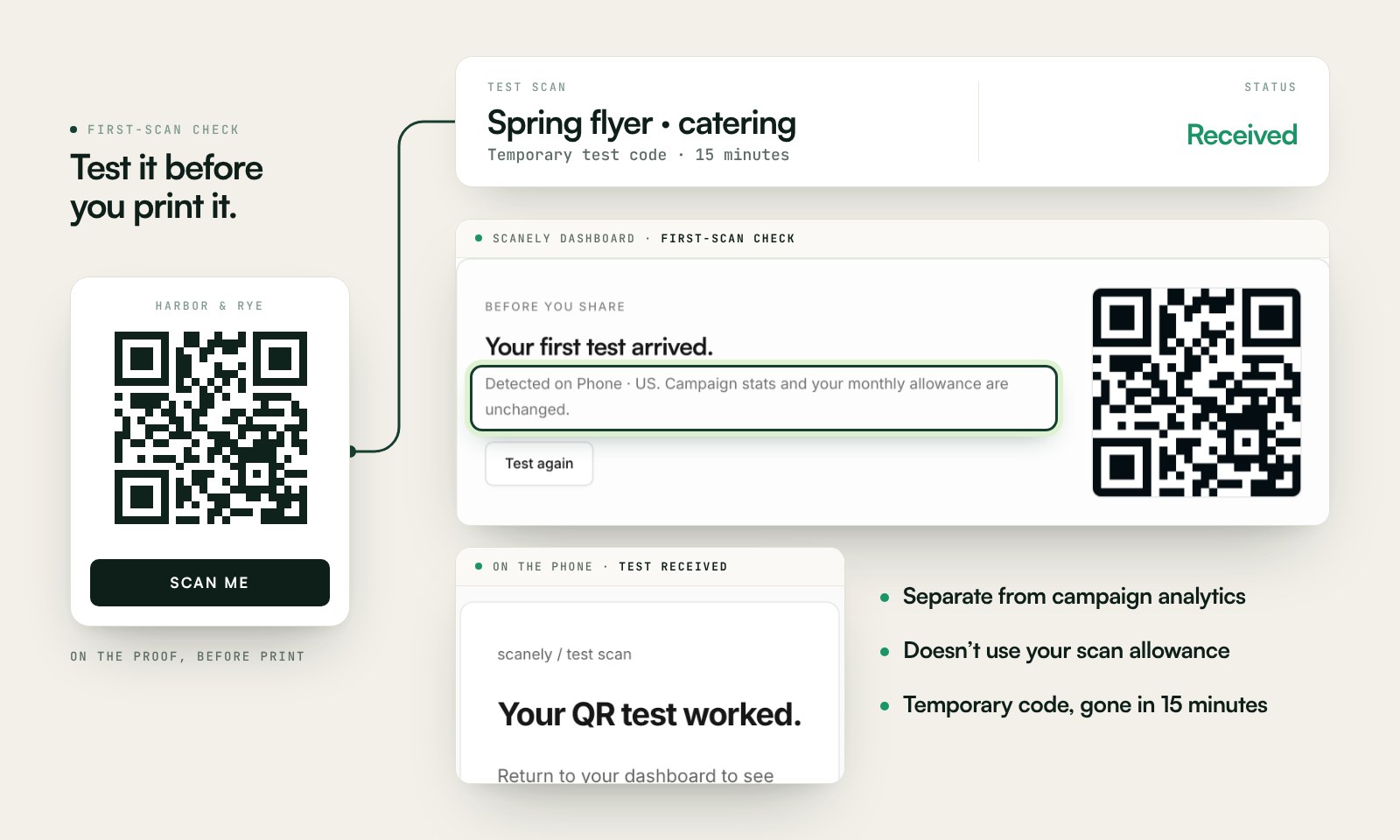
Scan a printed proof of your static download with a phone and check its destination. If you create a dynamic code in your Scanely account, First-scan check gives you a temporary test QR and confirms when your phone scans it.
The temporary code keeps test activity separate from campaign analytics. Never print it; download and test the final QR before ordering a batch.
Questions before you print
Is the survey QR code free?
Yes. Download the QR as PNG or SVG and the sign, table stand, sticker or card as a PDF at its exact print size. No account, no watermark and no scan limit on a static code. Scanely does not print signs: you print the PDF at the office or send it to a print shop.
Which survey tools work?
Any public survey link: Google Forms, Microsoft Forms, SurveyMonkey, Typeform, Jotform, Tally, Qualtrics, Zoho Forms, Formstack, Cognito Forms and a form on your own website. Scanely recognizes the common ones and refuses editor and results links that only you can open. Scanely is not a survey tool: the answers land in the tool you link.
Where do I find the link respondents use?
In the share or send step of your survey tool: Google Forms gives it under Send and as a forms.gle link, Microsoft Forms under Collect responses, SurveyMonkey under Collect responses and Web link, Typeform under Share, Jotform under Publish. Paste that link, not the one in your browser while you edit.
What happens when I change the survey?
A static QR always contains the same link, so a sign printed with one form keeps opening that form. If you run a new survey each season or want one code for several questions over the year, create a dynamic QR in your Scanely account first and print that one: its destination stays editable after printing and it counts scans. The Free plan includes three dynamic codes; Starter is $9 per month.
Which print sizes are there?
A US Letter sign for the lobby or the exit, a folded table stand for the counter or the table, an A6 flyer for the tray, a 70 × 70 mm sticker for the receipt or the window, and a business card to hand over with the bill. Every size keeps the empty border the code needs.
Can I ask staff instead of customers?
Yes. A code on the break-room board, the shift schedule or the pay slip opens the same survey; print the poster for the board and the card for the pocket. An anonymous survey stays anonymous: Scanely sees a scan, not an answer.
Does Scanely count responses?
No. A scan is not a response, and Scanely has no access to your survey tool. A dynamic Scanely QR counts scans, so you can compare the counter, the table and the receipt; the response count stays in the survey tool.