Free · No account needed
Now Hiring Sign Maker
Paste the link of your job posting or application form, Indeed, LinkedIn, a Google Form or the "We’re hiring" page from your Scanely account, and print a sign for the window, the door or the counter with the role, the pay and a QR code. Candidates apply from the pavement in two minutes instead of asking inside.
Free forever. Your codes never expire.The page a candidate opens to read the job and apply: Indeed, LinkedIn, a Google Form, your careers page or the Scanely "We’re hiring" page.
Printed at the bottom of the sign.
Free static QR. No watermark, no scan limit, and no expiry set by Scanely. The destination must remain available.
Your QR code
Generated in your browser. Scanely does not upload your link to generate this static QR.
For the window, the door and the counter
Your sign, with the role and the pay on it.
Pick the wording, add the role and one line of pay or hours, choose a poster or a card and download the PDF at its exact size.
Add a valid job link above to prepare your sign.
Print at 100% / actual size on heavier paper, or send the PDF to a print shop for a laminated window copy. Scan the printed sign once before putting it up.
Your sign
Now hiring
Scan to apply in two minutes
Your business
Or ask inside.
Content preview. Your PDF uses the US Letter poster · 8.5 × 11 in, for the window or the notice board format.
Behind the sign
A job page with the application form built in.
No posting yet? The "We’re hiring" template in your Scanely account is a job page with the role, hours, pay, what the work is like and an application form. Each application lands in Leads and in your email; edit the page for the next opening and the laminated sign stays in the window.
- The Free plan includes three dynamic codes and ten form replies a month; Starter is $9 per month for 50 codes.
- A dynamic code can be pointed at the next job after the sign is printed.
- Scanely is not a job board and not an applicant tracking system: it hosts the page and passes applications on.
What a scan shows
Sample content: the "We’re hiring" template. Dashboard > Pages > New page > Offer.
Keep the print. Change the link.
Create an account to make an editable QR and see scan counts. Your link, colors, and size will be ready in the creator.
A dynamic QR is a new code. Create and download it before printing; this static download will not become trackable.
What a hiring sign with a QR code does
A "Now hiring" sign in the window tells people who walk past that there is a job. Without a code it tells them to ask inside, which means the busiest person in the shop stops to explain the role while a queue waits. With a code the sign carries the posting: a candidate scans it from the pavement, reads the hours and the pay, and applies from the phone before the bus comes. The sign does the first interview; you read the applications in the evening.
This page makes the files. Scanely is not a job board and does not print signs: the applications go to the posting or the form you link, and you print the PDF at the shop or at a print shop.
Where the applications go
Paste the link a candidate opens, not the employer dashboard you use to read applications. Scanely refuses the employer pages it knows, because a scanned employer link shows the candidate a login screen.
- Indeed: open your posting as a job seeker would and copy its link; it starts with indeed.com/viewjob. employers.indeed.com is your dashboard.
- LinkedIn: copy the link of the job post under linkedin.com/jobs/view; linkedin.com/talent is the recruiter side.
- Google Forms: open the form, choose Send and copy the link; forms.gle links work too.
- Workable, Greenhouse, Lever, BambooHR, Homebase: copy the public job page link from the careers site these tools publish for you.
- Scanely "We’re hiring" page: create it from Dashboard, Pages, New page, Offer. It is a job page with the role, hours, pay, what the work is like and an application form; applications land in Leads and in your email.
Any public https link is accepted, including the careers page of your own website and the main European job boards.
Posters, window cards and counter cards
The sign kit prints the headline, the role, one line of pay or hours, the code with its call to action and your business name at the bottom. A US Letter or A4 poster with a 90 mm code reads from two metres through the window; a half Letter or A5 card with a 60 mm code fits the door or the counter; a business card goes into the hand of someone who asks. Print at 100% on heavier paper, or have a print shop laminate the window copy, and scan the printed sign once before putting it up.
Keep the sign when the job changes
The free code is static: it contains the link itself, so a sign printed for the barista job keeps opening the barista job. If you hire several times a year, create a dynamic QR in your Scanely account first and print that one. Its destination stays editable after printing, so the same laminated sign serves the next opening, and it counts scans, so you see whether the window or the counter brings the candidates; a scan is not an application. The Free plan includes three dynamic codes and ten form replies a month; Starter is $9 per month for 50 codes.
Hiring for the front desk? The booking QR code generator makes the sign for the appointments, the QR print templates cover more sign sizes, the Google Forms QR generator turns an application form into a code on its own, and you can check the QR in your downloaded image before printing. The trades that hire, a salon, a workshop, a cleaning company, hand the new hire a QR code business card on the first day.
Scanely is independent of Indeed, LinkedIn, Glassdoor, ZipRecruiter, Workable, Greenhouse, Lever, BambooHR, Homebase and Google. Their names are trademarks of their owners. Generating a code does not verify a job posting.
Check the scan before your print run
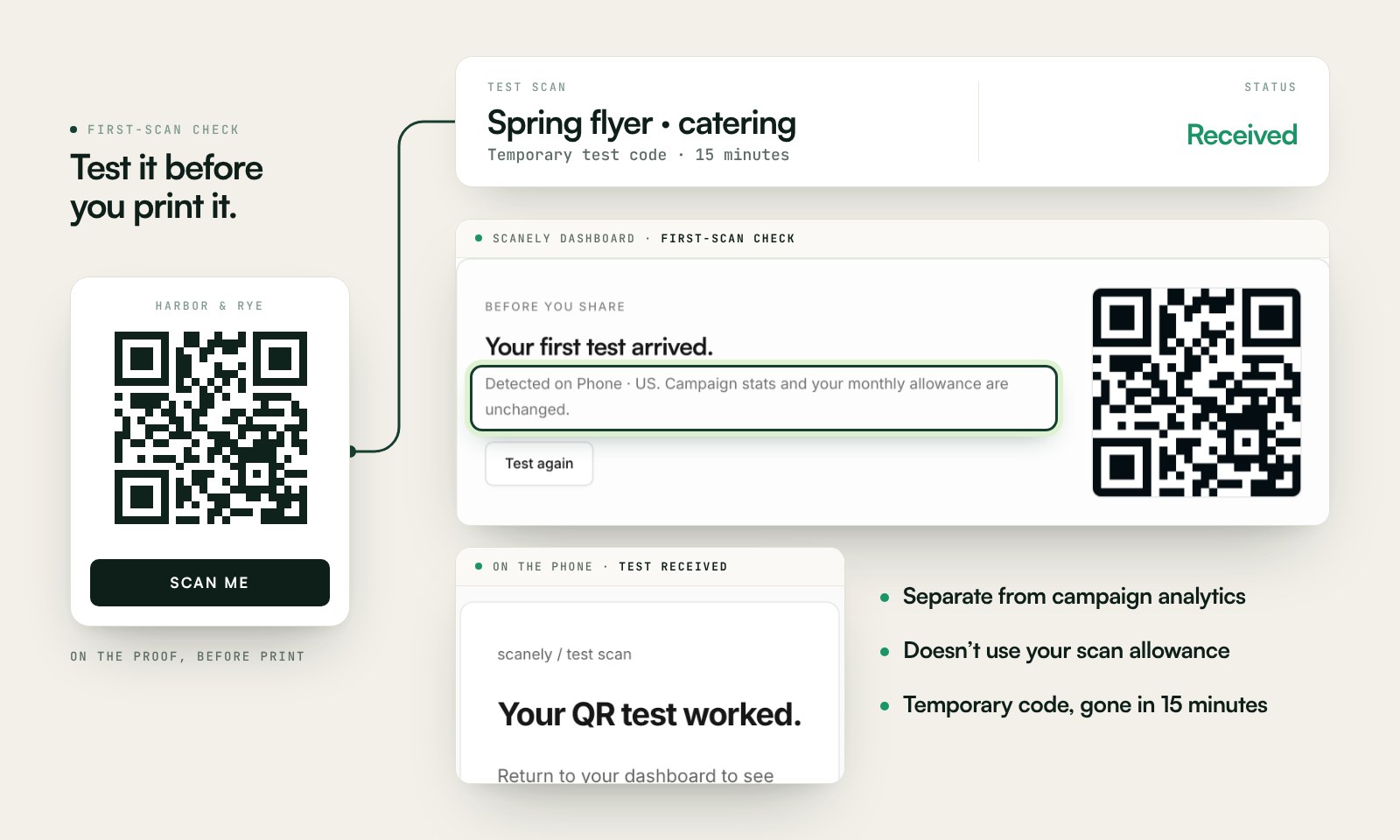
Scan a printed proof of your static download with a phone and check its destination. If you create a dynamic code in your Scanely account, First-scan check gives you a temporary test QR and confirms when your phone scans it.
The temporary code keeps test activity separate from campaign analytics. Never print it; download and test the final QR before ordering a batch.
Questions before you print
Is the now hiring sign free?
Yes. Download the QR as PNG or SVG and the sign as a PDF at US Letter, A4, half Letter, A5 or business card size. No account, no watermark and no scan limit on a static code. Scanely does not print signs: you print the PDF at the shop or send it to a print shop for a laminated window copy.
What link should the sign open?
The page where a candidate reads the job and applies: an Indeed, LinkedIn, Glassdoor or ZipRecruiter posting, a Workable, Greenhouse, Lever or BambooHR job page, a Google Form, the careers page of your website, or the "We’re hiring" page template from your Scanely account. Admin links that only you can open are refused.
Where do the applications go?
Wherever the link leads. With the Scanely "We’re hiring" page, each application lands in Leads in your dashboard and in the email you set, with the candidate’s name, phone, email and a few lines about their availability. Scanely is not a job board and not an applicant tracking system: it hosts the page and passes the replies on.
Which wording and sizes are there?
"Now hiring", "Help wanted" and "Join our team" as starting points; every line is editable, including the role, one line of pay or hours and the text under the code. Sizes: US Letter and A4 posters with a 90 mm code, half Letter and A5 cards with a 60 mm code for the door or the counter, and business cards to hand over.
Can I keep the sign when the job changes?
With a static code the link is printed into the pattern, so a sign for the barista job stays a sign for the barista job. Create a dynamic QR in your Scanely account first and print that one: its destination stays editable after printing, so the same laminated sign serves the next opening, and it counts scans. The Free plan includes three dynamic codes; Starter is $9 per month.
Does the sign work with Indeed and LinkedIn?
Yes. Paste the public link of the job posting, the one a candidate opens, not the employer dashboard. Scanely recognizes Indeed, LinkedIn, Glassdoor, ZipRecruiter, Workable, Greenhouse, Lever, BambooHR, Homebase and the main European job boards and refuses the employer pages it knows. Their names are trademarks of their owners.
Is this only for shops and restaurants?
No. A workshop, a clinic, a warehouse or a farm uses the same sign on the gate or the notice board; the wording and the sizes are the same, and the business card format works at a job fair.