Free · No account needed
Discord QR Code Generator
Paste a discord.gg invite link. Download a QR for a poster, a flyer, a stream overlay or a conference badge. Invites can expire, and the tool tells you what to do about it.
Free forever. Your codes never expire.In Discord open the server, choose Invite People, set the expiry to Never if the print should last, and copy the link.
Free static QR. No watermark, no scan limit, and no expiry set by Scanely. The destination must remain available.
Your QR code
Generated in your browser. Scanely does not upload your link to generate this static QR.
Keep the print. Change the link.
Create an account to make an editable QR and see scan counts. Your link, colors, and size will be ready in the creator.
A dynamic QR is a new code. Create and download it before printing; this static download will not become trackable.
Invites expire; posters do not
A Discord invite has an expiry (the default is 7 days) and an optional number of uses. Both are set when you create it, under Edit invite link. A printed QR code cannot be edited, so an invite that expires takes the poster with it. For anything you print, set Expire after to Never, or print a dynamic code: then the invite can be swapped in the dashboard and the printed code keeps working. Vanity links (discord.gg/yourname) are the exception: they stay valid while the server keeps the vanity URL.
What the tool accepts
- Invite.
discord.gg/code,discord.com/invite/codeordiscordapp.com/invite/code, normalised todiscord.gg/code. - Server discovery page.
discord.com/servers/…for a public server listed in Discovery. - Channel link.
discord.com/channels/…is accepted with a warning, because it opens only for existing members.
Login pages, the app download page and message links are rejected. The check looks at the address format; it cannot see whether the invite is still valid.
Where a Discord QR code works
- Stream overlay and video description. Viewers scan the screen with a phone.
- Posters at a LAN party, a club or a game store. The code with the server name and what people get there.
- Conference badges and slides. The community server for a talk or a product.
- Packaging. Board games and merch that come with a community.
How to create a Discord QR code
- Create the invite. Open the server, choose Invite People, then Edit invite link, and set Expire after to Never for anything printed.
- Paste it here. The tool checks that it is a discord.gg or discord.com/invite link and shows what the code will open.
- Download and test. Download PNG or SVG, print a proof and scan it from an account that is not in the server.
A static code is stuck on one invite
This download contains the invite itself and cannot be edited or counted. For a print that should outlive one invite, create a dynamic QR code first: when the invite changes, paste the new one in the dashboard and every printed copy follows. Free includes 3 dynamic codes and 1,000 scans a month.
See pricing. A Telegram group uses the Telegram QR generator, a YouTube channel the YouTube QR generator, and an event with a sign-up the event QR generator.
Scanely is independent of Discord.
Check the scan before your print run
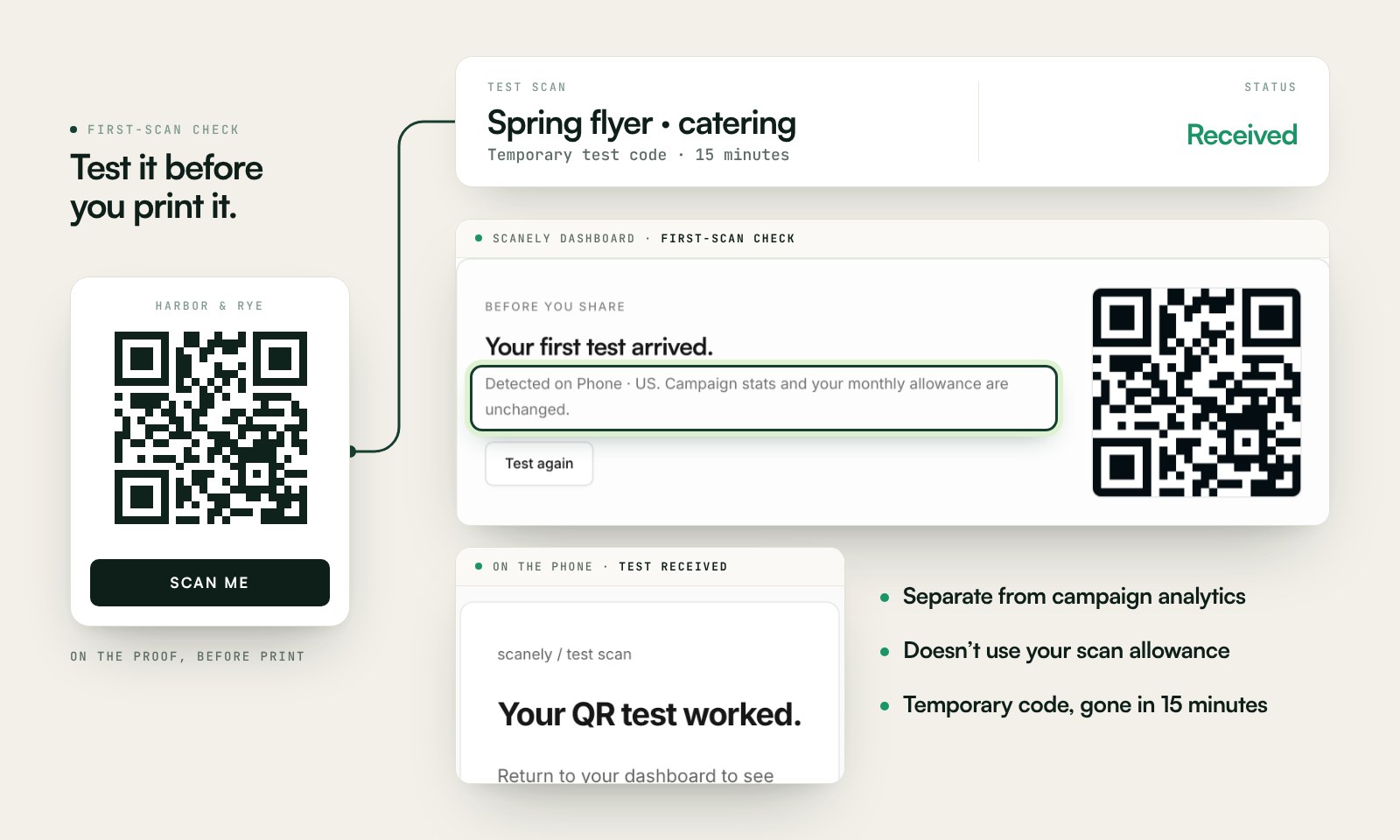
Scan a printed proof of your static download with a phone and check its destination. If you create a dynamic code in your Scanely account, First-scan check gives you a temporary test QR and confirms when your phone scans it.
The temporary code keeps test activity separate from campaign analytics. Never print it; download and test the final QR before ordering a batch.
Questions before you print
Is this Discord QR code generator free?
Yes. PNG and SVG are free, with no account, watermark or scan limit from Scanely. The static file is not counted; a dynamic Scanely code counts scans and can change the invite later.
My invite expires in 7 days. What happens to the print?
A static QR contains that invite for good. After it expires or hits its use limit, scanning shows “Invite invalid”. Either create an invite that never expires before you print, or print a dynamic Scanely code and paste a fresh invite whenever you need to.
Does the person need Discord?
The link works in a browser too: it shows the server and offers to join in the browser or in the app. People with the app installed usually land straight in it.
Can I link one channel instead of the server?
A channel link (discord.com/channels/…) opens only for members who are already in the server, so it is wrong for a poster. The tool accepts it with a warning. Use an invite for new people.
Can I use a vanity link like discord.gg/mycommunity?
Yes. Vanity links are invites with a custom code; they are accepted and do not expire while the server keeps the vanity URL.
Will the QR count how many people joined?
This static code counts nothing. A dynamic Scanely code counts scans, which is not the same as joins; Discord shows joins per invite in Server Settings.