Free · No account needed
YouTube QR Code Generator
Paste a video, Short, channel, or playlist link. We check that it is a public YouTube address, then you download a QR for a poster, menu, or package.
On a video, choose Share → Copy link. For a channel, copy youtube.com/@yourchannel.
Free static QR. No watermark, no scan limit, and no expiry set by Scanely. The destination must remain available.
Your QR code
Generated in your browser. Scanely does not upload your link to generate this static QR.
Keep the print. Change the link.
Create an account to make an editable QR and see scan counts. Your link, colors, and size will be ready in the creator.
A dynamic QR is a new code. Create and download it before printing; this static download will not become trackable.
Where to copy the link
- Video: open the video, choose Share, then Copy link. A
youtu.belink is fine; this tool turns it intoyoutube.com/watch?v=and drops share-tracking parameters. - Channel: open the channel and copy the address bar. Prefer
youtube.com/@yourchannel. Older/user/links can fail after a channel moves to an @handle. - Playlist: Share → Copy link on the playlist itself, not on one video inside it.
- Skip: YouTube Studio, home, and search. Viewers cannot open Studio, and a home link does not point at your content.
The check looks at the address format only. It cannot tell whether the video is public, age-restricted, or still online.
A useful YouTube QR
A café table tent can say “Watch how this drink is made” and open one video. A creator’s mailer or package is a better home for the channel, because the print outlives any single upload. A class handout can open a playlist. Put a short reason to scan next to the code. QR codes for social media compares a single profile with a page of several links.
Static or dynamic?
This download is static. It always opens the same YouTube address, with no Scanely account and no scan count. If the video may come down, or you want to point the same print at a new upload later, create a dynamic QR code and download that image before printing. The free plan includes 3 dynamic codes. A static file you already downloaded cannot be switched on later.
Size it with the QR size calculator. For another profile code, try the Instagram QR generator or the TikTok QR generator.
Scanely is independent of YouTube and Google.
Check the scan before your print run
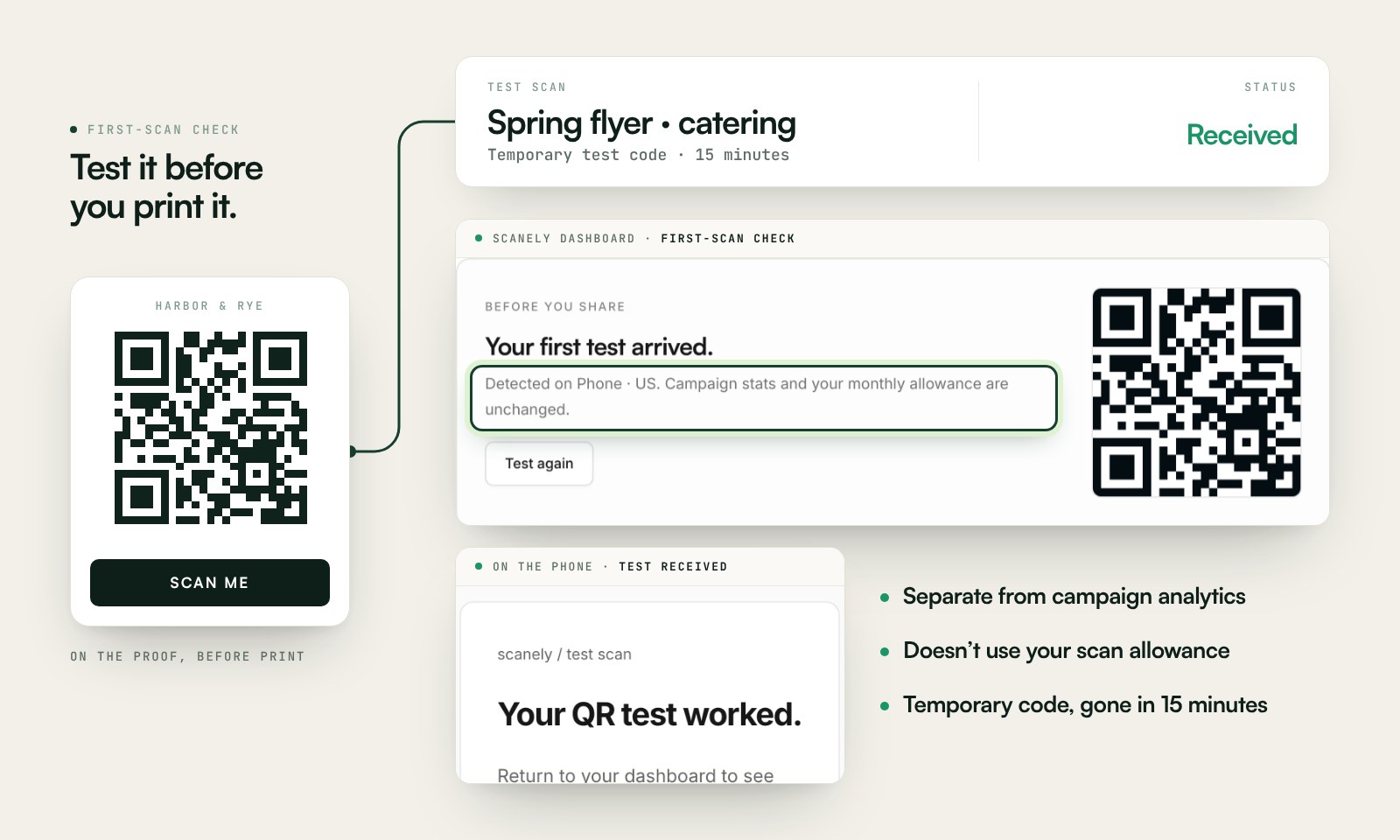
Scan a printed proof of your static download with a phone and check its destination. If you create a dynamic code in your Scanely account, First-scan check gives you a temporary test QR and confirms when your phone scans it.
The temporary code keeps test activity separate from campaign analytics. Never print it; download and test the final QR before ordering a batch.
Questions before you print
Is this YouTube QR code generator free?
Yes. Download a static QR for a video, Short, channel, or playlist as PNG or SVG. No account, watermark, or Scanely scan limit.
Where do I copy the YouTube link?
On a video or playlist, choose Share, then Copy link. For a channel, open the channel and copy the address, preferably one that looks like youtube.com/@yourchannel. YouTube Studio links are rejected because viewers cannot open them.
Will a youtu.be link work?
Yes. A youtu.be link with a video id is rewritten to the standard youtube.com/watch address, without share-tracking parameters. That keeps the QR a bit simpler.
Should I print a video, a Short, or the channel?
Use a video or Short when the scan should open that one piece. Use the channel on packaging and signs that will still be around after the video is old. A live link is a poor fit for a sign that stays up after the stream.
What if I rename the channel or take the video down?
A static QR keeps the address you encoded. A removed video or a changed handle can leave the print pointing nowhere. Create a dynamic Scanely QR before printing if you may swap the destination later and want scan counts.
How large should a YouTube QR be?
Use the QR size calculator. It follows a 10:1 guide: a code scanned from about 1 metre away needs to be about 10 cm across, including the blank border. A table tent can be smaller than a window poster. Print a proof and scan it in the room’s light.