Free · No account needed
Microsoft Forms QR Code Generator
Paste the link from Collect responses in Microsoft Forms. Download a QR for a feedback card, a classroom sign-up, an event survey or a notice board.
Free forever. Your codes never expire.In Microsoft Forms choose Collect responses, then Copy link. The edit link (DesignPage) is rejected.
Free static QR. No watermark, no scan limit, and no expiry set by Scanely. The destination must remain available.
Your QR code
Generated in your browser. Scanely does not upload your link to generate this static QR.
Keep the print. Change the link.
Create an account to make an editable QR and see scan counts. Your link, colors, and size will be ready in the creator.
A dynamic QR is a new code. Create and download it before printing; this static download will not become trackable.
Response link, not edit link
Microsoft Forms has two addresses for every form. The one in your browser bar while you build it ends in DesignPage.aspx and opens the editor; a scan of it asks for your sign-in. The one under Collect responses is short, forms.office.com/r/… or forms.cloud.microsoft/r/…, and opens the form for filling in. The tool accepts the second kind, including the long ResponsePage.aspx?id=… form, and rejects the first.
Who can respond
A form made in a work or school account is often limited to people in that organisation, and a scan then asks for a Microsoft sign-in. For a public survey change it in the form: the three dots, Settings, Who can fill out this form, Anyone can respond. For a class or a team the sign-in is the point; just test the code with an account that should be able to answer.
Where a Microsoft Forms QR code works
- Feedback cards. On the counter or in the parcel.
- Classroom and campus. Sign-ups, quizzes and attendance on the board.
- Events and training. The survey on the last slide and the handout.
- Workplaces. Incident reports, maintenance requests and polls on a notice board.
How to create a Microsoft Forms QR code
- Copy the response link. In Microsoft Forms open the form, choose Collect responses, then Copy link.
- Paste it here. The tool accepts response links and rejects the edit link, so the print cannot open your editor.
- Download and test. Download PNG or SVG, print a proof and open it in a private window from a phone.
A static code keeps one form
This download contains the response link itself and cannot be edited or counted. If the same card should open next term’s survey, create a dynamic QR code first and print that one; the destination changes in the dashboard, the print stays. Free includes 3 dynamic codes and 1,000 scans a month.
See pricing. A Google Form uses the Google Forms QR generator; a printed card with the code the survey QR code generator; a shared Word or Excel file the document QR generator.
Scanely is independent of Microsoft.
Check the scan before your print run
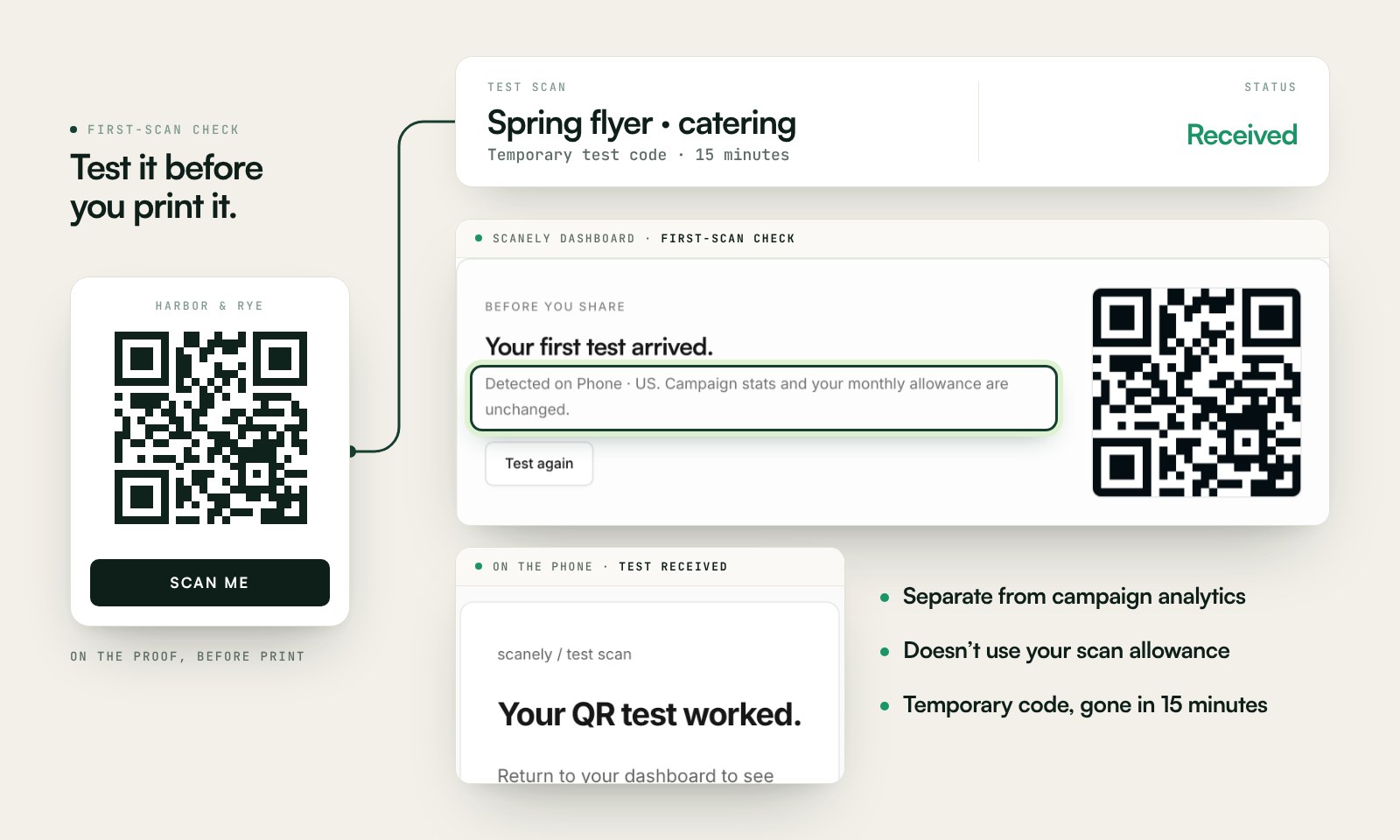
Scan a printed proof of your static download with a phone and check its destination. If you create a dynamic code in your Scanely account, First-scan check gives you a temporary test QR and confirms when your phone scans it.
The temporary code keeps test activity separate from campaign analytics. Never print it; download and test the final QR before ordering a batch.
Questions before you print
Is this Microsoft Forms QR code generator free?
Yes. PNG and SVG are free, with no account, watermark or scan limit from Scanely. Responses go to Microsoft Forms as usual; Scanely never sees them.
Why does the QR ask people to sign in?
Because the form is limited to people in your organisation. In Microsoft Forms choose the three dots, Settings, and set Who can fill out this form to Anyone can respond. Test the link in a private window.
Microsoft Forms has its own QR code. Why use this one?
Collect responses offers a QR too. This tool makes the same kind of link as a file in your colours and size, with the margin a scanner needs, and it can be a dynamic code you point at next term’s form without reprinting.
Can I edit the form after printing?
Yes. Editing questions keeps the same response link. Creating a new form gives a new link, and a static code will not follow it; a dynamic Scanely code can be repointed.
What about forms.cloud.microsoft links?
Those are the newer Forms addresses and are accepted, as are forms.office.com/r and /e links and the long ResponsePage links.
Does the QR work for Google Forms too?
No, this page checks Microsoft addresses. Google Forms has its own page with the responder link check.