Free · No account needed
QR Code Print Templates
A review card for the counter. A feedback sign for the lobby. A menu stand or a table tent for the table. Add your link and leave with a print-ready PDF.
Free forever. Your codes never expire.Test the link on a phone to confirm it opens the right page.
Free static QR. No watermark, no scan limit, and no expiry set by Scanely. The destination must remain available.
Your QR code
Generated in your browser. Scanely does not upload your link to generate this static QR.
Ready for your counter
Make it a print-ready card or sign.
Add a short invitation and download a PDF at its exact print size. No account or watermark.
Add a valid link above to prepare your print.
Print at 100% / actual size. Keep the QR border clear and test one physical sample before printing a batch. Cards are individual pages; ask your printer to arrange them on a sheet.
Review us on Google
Tell us about your experience.
Content preview. Your PDF uses the selected 3.5 × 2 in layout.
Keep the print. Change the link.
Create an account to make an editable QR and see scan counts. Your link, colors, and size will be ready in the creator.
A dynamic QR is a new code. Create and download it before printing; this static download will not become trackable.
Make a useful invitation, not just a QR
Tell people what will happen when they scan. Each template pairs your QR with a short call to action and optional business name. The download is a static code that opens your link directly.
Match the layout to the placement
Hand out a review card with a receipt, set a feedback sign near an event exit, or fold a menu stand for a table. Start with your Google review link, a feedback form, or an existing PDF menu.
Long URLs make denser codes. If a small card fails the print check, choose a larger format or use a shorter link supplied by your provider. The checks cover contrast, module size, and the clear border; always test the actual printed result.
Explore placements for restaurants, events, and retail counters. Our QR call-to-action examples help you match the wording to the destination.
Before a batch, follow the QR printing guide and check the QR image. Test the physical paper too.
QR code table tent
A table tent is the stand guests read while they wait: fold the printed sheet into a triangle and it holds the menu, the Wi-Fi code, the review link or the booking page at eye level on the table, the counter or the reception desk. The Table tent template prints the US Letter stand (fold into thirds) or the A4 stand (folds at 99 and 198 mm) with your name, a call to action and the code; join the outer edges underneath with tape and use card stock for anything that stays out for a season. For the Wi-Fi version, the Wi-Fi QR generator prints the same stand with the network code; for appointments, the booking QR code generator adds a door sticker and cards; for a review card to hand over with the bill, use the Google review card.
QR code table tent
A table tent is the stand guests read while they wait: fold the printed sheet into a triangle and it holds the menu, the Wi-Fi code, the review link or the booking page at eye level on the table, the counter or the reception desk. The Table tent template prints the US Letter stand (fold into thirds) or the A4 stand (folds at 99 and 198 mm) with your name, a call to action and the code; join the outer edges underneath with tape and use card stock for anything that stays out for a season. For the Wi-Fi version, the Wi-Fi QR generator prints the same stand with the network code; for appointments, the booking QR code generator adds a door sticker and cards; for a review card to hand over with the bill, use the Google review card.
Check your format before the print run
The dashboard Print kit lets you choose a print format, review its preview and check contrast, module size and the clear border before downloading the PDF. This free tool creates a static QR; the clip shows the Print kit for a saved dashboard code.
Watch Print kit
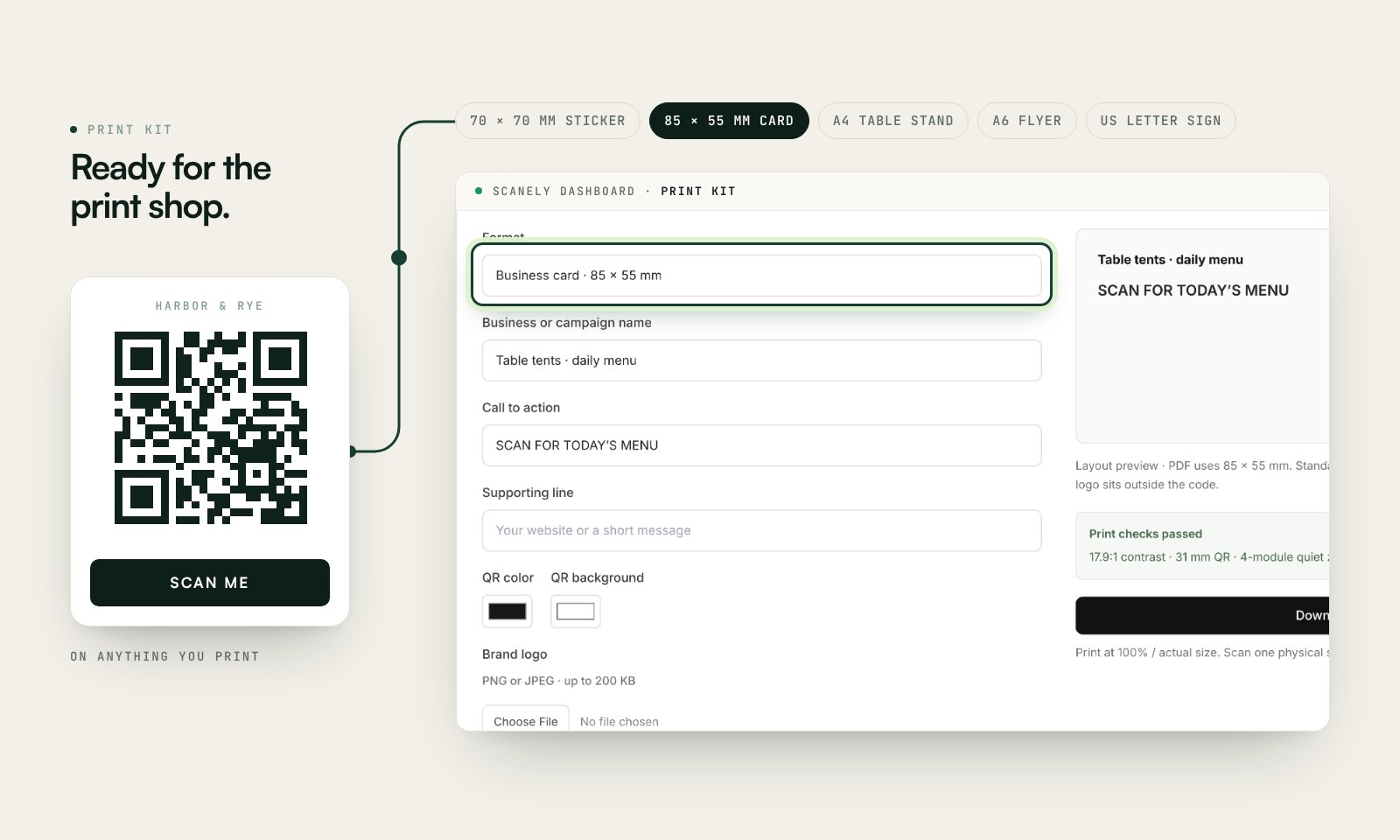
Track different print placements
To compare a counter sign with a receipt card, create separate dynamic codes and campaign tags in your account, then use the dashboard Print kit. A scan count shows interaction with a code; it does not prove a completed review, form response, or order.
Read the print kit documentation or calculate a QR size for the viewing distance.
Check the scan before your print run
Scan a printed proof of your static download with a phone and check its destination. If you create a dynamic code in your Scanely account, First-scan check gives you a temporary test QR and confirms when your phone scans it.
The temporary code keeps test activity separate from campaign analytics. Never print it; download and test the final QR before ordering a batch.
Watch First-scan check
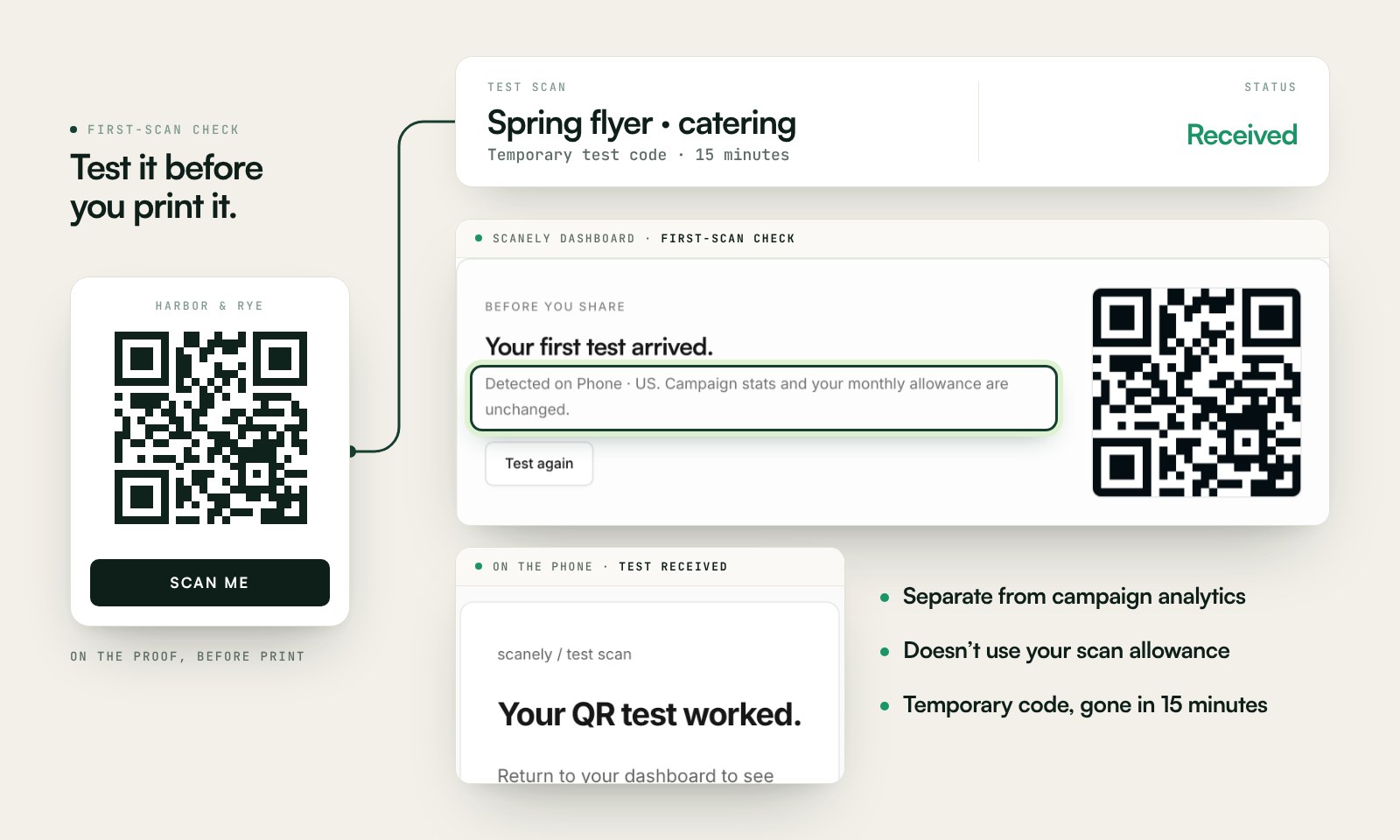
Questions before you print
Are these QR print templates free?
Yes. Create a review card, feedback sign, or menu stand with a static QR and download the PDF without an account or watermark.
Which paper sizes are supported?
US business card (3.5 × 2 inches), US Letter sign and folded stand (8.5 × 11 inches), plus a 70 mm sticker, 85 × 55 mm card, A6 flyer, and A4 folded stand. Cards are individual pages, not multi-card sheets.
What print settings should I use?
Choose actual size or 100%, not fit to page. Check that the paper matches the PDF dimensions. Keep the QR’s clear border, scan one printed sample, and then print your batch.
Can I use these layouts with a tracked QR?
Yes. Create a dynamic QR in your Scanely account first, then open its Print kit in the dashboard. The same formats are available there. A free static print from this page does not track scans.
How do I fold the QR code table tent?
The table tent prints on one US Letter or A4 sheet with two dashed fold lines: the top third is the back panel, the middle panel carries your name, the call to action and the code, the bottom third is the base. Print at 100%, fold along both lines into a triangle with the code facing the guest, and join the outer edges underneath with tape. Card stock of 160 to 250 g holds its shape; plain paper is fine for a test.
What goes on a table tent?
Whatever a seated guest needs: the menu, the Wi-Fi code, the review link, the booking page, a feedback form or an event programme. Pick the Table tent template, paste the link and edit the call to action; the Wi-Fi QR generator prints the same stand with the network code.