Free · No account needed
Video QR Code Generator
Paste the link of a video on YouTube, Vimeo, Google Drive, Dropbox, iCloud or OneDrive and download a QR code that plays it, plus a small "Scan to watch" card for a greeting card, a gift tag, product packaging or a sign. Scanely does not host the video; the code opens it where it already lives.
Free forever. Your codes never expire.The public link viewers open: YouTube, Vimeo, Google Drive, Dropbox, iCloud, OneDrive, Loom, TikTok, Instagram or a video page on your site.
Printed at the top of the card, the sticker and the sign.
Free static QR. No watermark, no scan limit, and no expiry set by Scanely. The destination must remain available.
Your QR code
Generated in your browser. Scanely does not upload your link to generate this static QR.
Ready for your counter
Make it a print-ready card or sign.
Add a short invitation and download a PDF at its exact print size. No account or watermark.
Add a valid link above to prepare your print.
Print at 100% / actual size. Keep the QR border clear and test one physical sample before printing a batch. Cards are individual pages; ask your printer to arrange them on a sheet.
Scan to watch
A video message, just for you.
Content preview. Your PDF uses the selected 85 × 55 mm layout.
Swap the video, keep the print
A dynamic code plays this year's video on last year's packaging.
The code above is static: it carries the video link itself and keeps it for as long as the video stays online. A dynamic code from your Scanely account opens a short link you can point at a new video any time, so a how-to video on a product, a welcome video on a sign or a seasonal message on a card changes without reprinting, and you see how many people scanned where.
- The Free plan includes 3 dynamic codes; Starter is $9 per month for 50 codes, Business has no code limit for a product range.
- Point the code at a new video from the dashboard; the printed code stays the same.
- Scanely does not host or convert the video: it makes the code, the card and the scan count.
Keep the print. Change the link.
Create an account to make an editable QR and see scan counts. Your link, colors, and size will be ready in the creator.
A dynamic QR is a new code. Create and download it before printing; this static download will not become trackable.
Where the video should live
A QR code cannot hold a video; it holds a link. So the video needs a home that opens on any phone without an account: YouTube, where an unlisted video stays out of search but plays for anyone with the link; Vimeo; a Google Drive file or folder shared with "Anyone with the link"; Dropbox, iCloud or OneDrive sharing links; Loom for a screen recording. Copy the link viewers open, not the one in your browser while you edit: YouTube Studio, the Vimeo manage page and your Drive home are refused here because a scan would land on a login screen. Skip WeTransfer and similar transfer links; they expire after a few days and the card outlives them.
For a YouTube video, channel or playlist in particular, the YouTube QR code generator checks the link more closely and rewrites youtu.be addresses.
A video in a card
A Christmas card, a birthday card, a wedding thank-you or a card for a grandparent can carry a video message: record it on the phone, upload it unlisted, paste the link, and print the business-card-sized "Scan to watch" card from the kit above. Tuck it inside, or stick the sticker on the inside page. The person points the phone camera at it and the message plays; nobody installs anything. Write who it is from on the card itself, because a bare code on a card looks like advertising. For a memorial card, the memorial QR code page combines a video or a photo album with a guest book.
On packaging and signs
A how-to video on a product box, a welcome video on a holiday-let sign, a tour on a for-sale board, a recipe on a food label: the same card, sticker or sign works, with "Scan to watch" replaced by what the video does ("Scan for the 2-minute setup video"). Printed packaging is where a dynamic code earns its keep: the box is printed once, the video changes with every revision of the product. A dynamic Scanely code opens a short link you repoint from the dashboard, and the scan count per placement tells you whether the box, the insert or the shelf sign is the one people use. The dynamic QR generator explains the difference; the Free plan includes 3 dynamic codes and Starter is $9 per month for 50.
Size and a test scan
A code read in the hand wants 20 mm or more; the card in the kit carries a 31 mm code and the sticker 38 mm. Longer links make denser codes, so a youtu.be address or a dynamic short link scans more easily than a long Drive link, and a small code with a long link is the usual reason a card fails. The QR size calculator gives the number for a sign read from across a room. Print one copy at 100%, scan the image and the printed copy, and watch the video play on an iPhone and an Android phone before the batch goes to print.
For a party invitation with a video, an RSVP form and the gift list behind one code, see the party QR code page.
Scanely is independent of YouTube, Vimeo, Google, Dropbox and Apple.
Check the scan before your print run
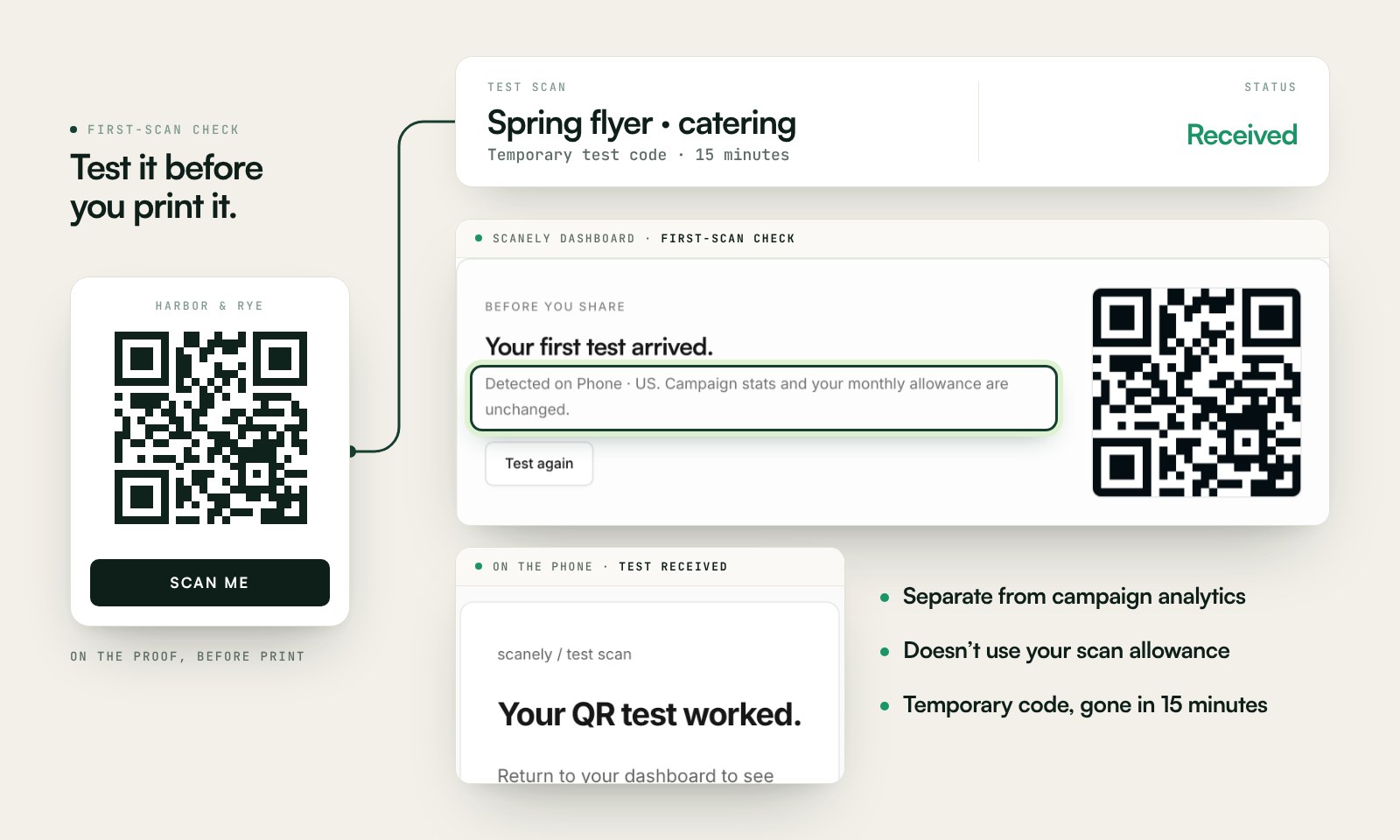
Scan a printed proof of your static download with a phone and check its destination. If you create a dynamic code in your Scanely account, First-scan check gives you a temporary test QR and confirms when your phone scans it.
The temporary code keeps test activity separate from campaign analytics. Never print it; download and test the final QR before ordering a batch.
Questions before you print
Is the video QR code free?
Yes. Download the QR as PNG or SVG and the "Scan to watch" card, sticker or sign as a PDF at its exact print size. No account, no watermark and no scan limit on a static code. Scanely does not host or convert the video: the code opens the video where you uploaded it.
Which video links work?
Any public https link that opens the video: YouTube (public or unlisted, Shorts too), Vimeo, a Google Drive file or folder shared with "Anyone with the link", Google Photos, Dropbox, iCloud, OneDrive, Loom, TikTok, Instagram, Facebook, Twitch, Wistia or a video page on your own site. Editor and upload links such as YouTube Studio are refused because viewers cannot open them. WeTransfer links are accepted with a warning: they expire after a few days.
How do I put a video message in a Christmas or birthday card?
Record the message on your phone, upload it to YouTube as unlisted or to a Google Drive folder shared with anyone with the link, paste that link here and print the business-card-sized "Scan to watch" card from the print kit. Tuck it into the card or stick the 70 × 70 mm sticker inside. The person scans with the phone camera and the video plays; no app is needed.
Can I change the video after the card is printed?
A static QR always contains the same link, so a printed code keeps opening the video you pasted; if you delete the video or change its sharing, the code opens nothing. For a code you can repoint later, create a dynamic QR in your Scanely account first and print that one: its destination stays editable after printing and it counts scans. The Free plan includes 3 dynamic codes; Starter is $9 per month for 50.
Will the video play right away?
The phone opens the link in the browser or the app: YouTube and Vimeo show the player, sometimes with an ad first; Google Drive and Dropbox open a preview with a play button; iCloud and OneDrive do the same. Keep the file small enough for mobile data, and scan a printed proof on an iPhone and an Android phone before you print a batch.
Does Scanely host or convert the video?
No. Scanely makes the code and the printable card; the video stays on YouTube, Vimeo, Drive or wherever you put it. File hosting on paid Scanely plans covers PDFs and images, not video. Scanely is independent of YouTube, Vimeo, Google, Dropbox and Apple.
How big should the code be on a card or a package?
At least 20 mm on a card read in the hand; the business card in the print kit carries a 31 mm code and the sticker a 38 mm code. On packaging read from the shelf, 25 mm or more with the empty border. Longer links make denser codes, so a youtu.be link or a dynamic short link scans more easily than a long Drive address. The QR size calculator gives the number for any distance.