Free · No account needed
Table Tent Maker
Paste the link the code should open and lay out the table tent: your logo, your name, one sentence and a call to action next to the code, on both faces of a folded card, in one of five styles and your brand colour. Choose a half-fold Letter or A4 sheet, or a 7 × 5 in, 6 × 4 in or A6 tent card cut from a sheet, number the tables if you like, and download the print-ready PDF with the fold line.
Free forever. Your codes never expire.The menu page, your Google review link, the ordering or booking page. Public and https. For Wi-Fi, use the Wi-Fi QR generator instead.
Free static QR. No watermark, no scan limit, and no expiry set by Scanely. The destination must remain available.
Your QR code
Generated in your browser. Scanely does not upload your link to generate this static QR.
For the table, the bar and the counter
The table tent, ready to print and fold.
Pick a style, add your logo and your colour, write the name, one sentence and the call to action, and number the tables if you like. Download the PDF, print on card, fold along the dashed line and set it on the table.
8.5 × 5.5 in faces, one tent per Letter sheet, no cutting
PNG or JPEG up to 200 KB. It stays in your browser and is drawn into the PDF only.
Both faces print on one sheet; the back is turned so it reads upright once folded. Words only is the place for the Wi-Fi name and password or a thank-you.
Add a valid link above to prepare your table tent.
The PDF is one sheet per tent at 100% / actual size: the front on the lower half, the back printed upside down on the upper half, a dashed fold line between them and a grey cut guide on the smaller cards. Print on card, fold, and scan the finished tent once before you make more.
Front of your tent
Harbor Street Coffee
Scan to see the menu
One face at its real proportions. Your PDF uses the Half-fold Letter sheet, 56 mm code.
Behind the tent
A menu page that changes with the day.
The Restaurant menu template in your Scanely account is the page behind the tent: sections, dishes, prices and photos, edited from your phone, with opening hours and a link to book. Point a dynamic code at it and the printed tents stay right when the menu changes; on Pro, Business and Lifetime plans a daily schedule sends the same code to the lunch menu at noon and the dinner menu in the evening.
- The Free plan includes three dynamic codes; Starter is $9 per month for 50 codes, Business has no code limit for a whole chain.
- A dynamic code keeps a printed tent right after the menu moves; a static code cannot.
- Scanely does not print or ship table tents: it makes the code, the layout and the page.
What a scan shows
Sample content: the Restaurant menu template. Dashboard > Pages > New page > Restaurant menu.
Keep the print. Change the link.
Create an account to make an editable QR and see scan counts. Your link, colors, and size will be ready in the creator.
A dynamic QR is a new code. Create and download it before printing; this static download will not become trackable.
What a table tent is for
A table tent is the card guests read while they wait: the menu before the server comes, the review link with the bill, the ordering page on a busy terrace, the booking page at the bar, the program at a dinner. The code opens the page; the card says in large type what the code does, so nobody has to guess. Both faces carry the same design, so the tent reads from either side of the table.
This page makes the file. Scanely does not print or ship table tents: you print the PDF on card, cut where the guide shows and fold.
Five styles, your logo and your colour
Classic is a white card with one ink and the code on a soft panel. Bold fills the card with your brand colour edge to edge, sets the type in white and keeps the code on a white card. Elegant uses a warm white, a serif face and two thin rules for a bistro or a hotel bar. Chalkboard is a dark board with chalk-white type and a dashed border for a café or a pub. Playful puts the call to action in a coloured pill with rounded corners. Every style keeps the code dark on a white card, because a code printed in a light colour or on a dark ground scans badly. Add a logo (PNG or JPEG under 200 KB) and it sits above the name; the logo stays in your browser and is drawn into the PDF only.
Numbered tables and a different back
Tick Numbered tables and the PDF holds one tent per table, up to sixty, each with its label such as Table 12. If you also put the number in the link, every tent gets its own code with ?table=12 added: ordering and booking systems read the table from it, and a menu page simply ignores it. The back of the tent can repeat the front, carry different words with the same code, carry words only (the Wi-Fi name and password, a thank-you, tonight's special) or stay blank. Whatever you choose, the back is printed upside down on the sheet so that it reads upright once the card is folded.
Sizes, and which to pick
The half-fold Letter and A4 sheets make the largest tent, with 8.5 × 5.5 in or 210 × 148 mm faces, and need no cutting: they suit a bar counter, a buffet or a reception desk read from a few steps away. The 7 × 5 in card is the classic restaurant tent; the 6 × 4 in and A6 cards fit a café table or a bar top without crowding the glasses, and the A6 card prints two to an A4 sheet. All faces are landscape, so the call to action can run large next to the code. For a stand with a base that will not slide, the QR print templates page has a three-panel table stand folded into thirds.
Printing, cutting and folding
Print at 100% or actual size, never fit to page, on card of 200 to 300 gsm (80 to 110 lb cover); ordinary paper sags within an hour. The front sits on the lower half of the sheet and the back on the upper half, printed upside down on purpose: once folded, both read upright. Cut along the thin grey guide on the smaller cards, score the dashed fold line with a ruler and the back of a knife so the card folds clean, and fold. A sharp fold stands on its own; for a tent that stays out for a season, laminate the sheet before folding or add a drop of glue inside the fold. Scan the finished tent from a seat before you print the rest.
The code: size and distance
A code read from a seat across the table wants about 40 mm; the cards here use 42 mm on the small formats and 56 mm on the half-fold sheets. The check under the form confirms the module size for your link: a long link makes a denser code, a short one keeps it coarse and easy to scan under warm restaurant light. The QR size calculator gives the number for any other distance, and you can check the QR in your downloaded image before printing.
Static or dynamic, and the menu that changes
A static code carries the link itself. For a review link that never changes, that is fine. For a menu, it is a bet that the page never moves: a new website, a new PDF or a new ordering system means reprinting every tent. A dynamic code from your Scanely account opens a short link you can point at a new page any time, and it counts scans, which tells you which tables and which placements are read. On Pro, Business and Lifetime plans, a daily schedule sends the same code to the lunch menu at noon and the dinner menu in the evening, and a weekday rule covers the weekend brunch. The promise for printed codes says in writing what happens to a Scanely code. The Free plan includes three dynamic codes; Starter is $9 per month for 50 codes.
What goes behind the code
For a menu, a page that loads fast on a phone over mobile data: the Restaurant menu template in your Scanely account, a PDF or your website; the menu QR code generator explains the three ways. For reviews, your Google review link, and the Google review card makes the small card to hand over with the bill. For ordering and booking, the link your ordering or booking system gives you; the tent says "Scan to order from your table", the system does the rest. For Wi-Fi, use the Wi-Fi QR generator: a Wi-Fi code is not a link, and that tool prints its own sign and stand. More placements for a restaurant, from the window to the receipt, are on the QR codes for restaurants page.
Check the scan before your print run
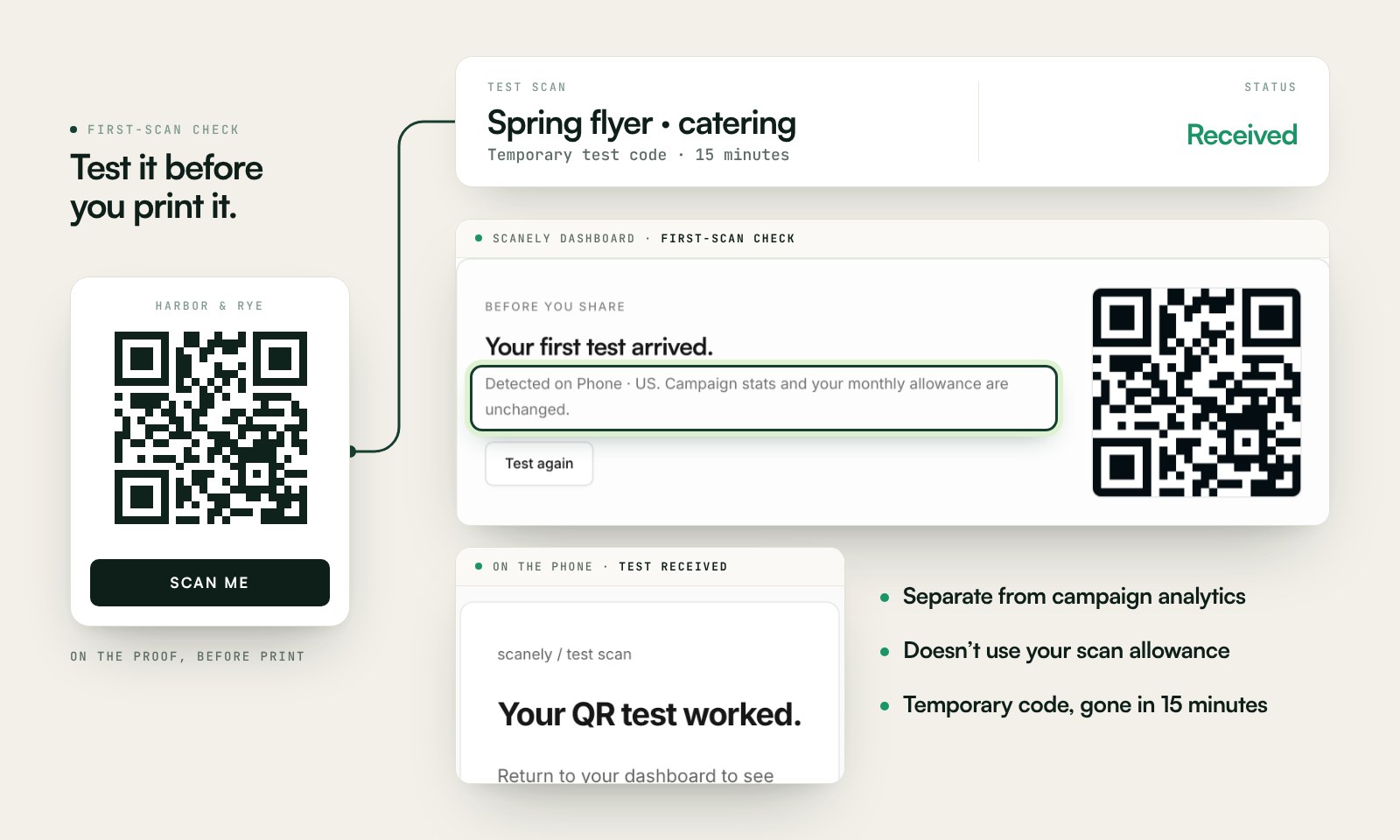
Scan a printed proof of your static download with a phone and check its destination. If you create a dynamic code in your Scanely account, First-scan check gives you a temporary test QR and confirms when your phone scans it.
The temporary code keeps test activity separate from campaign analytics. Never print it; download and test the final QR before ordering a batch.
Questions before you print
Is the table tent maker free?
Yes. Download the QR as PNG or SVG and the table tent as a print-ready PDF. No account, no watermark and no scan limit on a static code. Scanely does not print or ship table tents: you print the PDF on card at home, at the office or at a print shop, cut where the guide shows, and fold.
Which size should I pick?
A half-fold Letter or A4 sheet makes the largest tent, with 8.5 × 5.5 in or 210 × 148 mm faces, and needs no cutting: good for a bar counter or a reception desk read from a few steps away. The 7 × 5 in card suits a restaurant table; the 6 × 4 in and A6 cards fit a café table or a bar top without crowding the glasses. The A6 card prints two to an A4 sheet.
How do I print and fold it?
Print the PDF at 100% or actual size, never fit to page, on card of 200 to 300 gsm (80 to 110 lb cover). The front is on the lower half and the back on the upper half, printed upside down on purpose. Cut along the thin grey guide on the smaller cards, score the dashed line with a ruler and the back of a knife, fold, and the two faces read upright from both sides of the table. Scan the finished tent once before you make more.
What is a good size for the QR code on a table?
A code read from a seat across the table wants about 40 mm; the sizes here use 42 to 56 mm depending on the card. The check under the form confirms the module size for your link: a long link makes a denser code, a short one keeps it coarse. For other distances, the QR size calculator gives the number.
Static or dynamic code for a table tent?
A static code carries the link itself: if the menu moves to a new page or the review link changes, you reprint every tent. A dynamic code from your Scanely account opens a short link you can point anywhere later, and it counts scans per table. The Free plan includes three dynamic codes; Starter is $9 per month for 50.
What should the code open?
For a menu, a page that loads fast on a phone over mobile data: the Restaurant menu template in your Scanely account, a PDF or your website. For reviews, your Google review link. For ordering or booking, the link your ordering or booking system gives you. For Wi-Fi, use the Wi-Fi QR generator instead: a Wi-Fi code is not a link, and that tool prints its own sign and stand.
Can both faces say different things?
Yes. Under Back of the tent choose the same face again, different words with the same code, words only without a code, or a blank back. Words only is the place for the Wi-Fi name and password or a thank-you; the back is printed upside down on the sheet so it reads upright once folded. With Numbered tables the maker prints one tent per table, with the table label on the face and, if you tick it, the table number in the link so each tent carries its own code.