Free · No account needed
Image QR Code Generator
Paste the link of a photo or an album on Google Photos, Google Drive, Dropbox, iCloud, OneDrive, Imgur, Flickr or your own site and download a free QR code that opens it, with a small "Scan to see the photos" card for a print, a frame or a gift. To host the picture on Scanely and swap it without reprinting, upload it on a monthly plan.
Free forever. Your codes never expire.The public sharing link of the picture or the album: Google Photos, Google Drive, Dropbox, iCloud, OneDrive, Imgur, Flickr or an image on your site.
Printed at the top of the card, the sticker and the sign.
Free static QR. No watermark, no scan limit, and no expiry set by Scanely. The destination must remain available.
Your QR code
Generated in your browser. Scanely does not upload your link to generate this static QR.
Need somewhere to host the picture?
Upload a JPEG, PNG, WebP or GIF to Scanely with a monthly Starter, Pro or Business subscription: the code opens the picture full-screen on the phone, you can replace the file while keeping the printed QR, and the dashboard counts the scans. Up to 20 MB per file; your plan's storage limit applies. File hosting is not included in Free or Lifetime.
Compare monthly plansReady for your counter
Make it a print-ready card or sign.
Add a short invitation and download a PDF at its exact print size. No account or watermark.
Add a valid link above to prepare your print.
Print at 100% / actual size. Keep the QR border clear and test one physical sample before printing a batch. Cards are individual pages; ask your printer to arrange them on a sheet.
Scan to see the photos
The album is on the other side of this code.
Content preview. Your PDF uses the selected 85 × 55 mm layout.
Keep the print. Change the link.
Create an account to make an editable QR and see scan counts. Your link, colors, and size will be ready in the creator.
A dynamic QR is a new code. Create and download it before printing; this static download will not become trackable.
What an image QR code is
A QR code holds a short text, usually a link, so it cannot hold the picture itself. An image QR code is a code that opens a photo or an album when someone scans it: the picture lives on Google Photos, Google Drive, Dropbox, iCloud, OneDrive, Imgur, Flickr, your own website or Scanely's file hosting, and the code carries the link. This page makes the code from a link you already have, with a "Scan to see the photos" card, and explains when to host the picture on Scanely instead.
Where the picture should live
Pick a home that opens on any phone without an account. Google Photos: open the photo or album, Share, Create link. Google Drive: share the file or the folder with "Anyone with the link" and copy the link, not the address of your My Drive. Dropbox, OneDrive and iCloud shared albums give a sharing link too. A direct image file on your site (a .jpg or .png address) opens the picture itself with nothing around it. Avoid WeTransfer and similar transfers; they expire after a few days and the print outlives them. Open the link in a private browser window before you print: if it asks you to sign in, so will the scan.
On a print, a frame or a gift
The back of a photo print can carry the whole album: tuck the card from the kit into the envelope or stick the sticker on the back, and the person scans it to see the rest of the day. A framed print at home or in a café can open the series, the story behind the picture or the video it came from. A gift tag can open a photo message. For a shared album that guests fill during a wedding or a party, the wedding QR code and party QR code pages print the same card with an RSVP page behind it. Write what the code opens next to it; a bare code on a print looks like advertising.
Hosted on Scanely: swap the picture without reprinting
The free code is static: it carries the link itself and keeps it for as long as the picture stays where it is. If you want to change the picture later, a menu board photo, a seasonal poster, a product shot on packaging, host it on Scanely instead: choose File / PDF in the dashboard on a monthly Starter, Pro or Business plan, upload a JPEG, PNG, WebP or GIF up to 20 MB, and print the code it gives you. The scan opens the picture full-screen on the phone, you replace the file whenever you like while the printed code stays the same, and the dashboard counts the scans. Your plan's storage limit applies; file hosting is not included in Free or Lifetime, and a dynamic code pointing at a picture hosted elsewhere works on every plan, including Free with 3 dynamic codes. The plans page has the storage limits; the PDF QR code generator does the same for documents.
Size and a test scan
A code read in the hand wants 20 mm or more; the card in the kit carries a 31 mm code and the sticker 38 mm. A framed print read from a step away wants 30 mm with the empty border. Long links make dense codes, so a short sharing link or a dynamic short link scans more easily than a long Drive address. The QR size calculator gives the number for any distance. Print one copy at 100%, scan the image and the printed copy, and watch the picture open on an iPhone and an Android phone before the batch goes to print.
A Google Photos album
A shared Google Photos album link (photos.app.goo.gl/… or photos.google.com/share/…) works here: open the album, choose Share, then Create link, and paste it. The code opens the whole album, which suits a wedding, a class trip or an event where people add their own photos. Set the album to allow adding photos only if you want that, and remember that a static code keeps that one album for good.
Scanely is independent of Google, Apple, Dropbox, Microsoft, Imgur and Flickr.
Check the scan before your print run
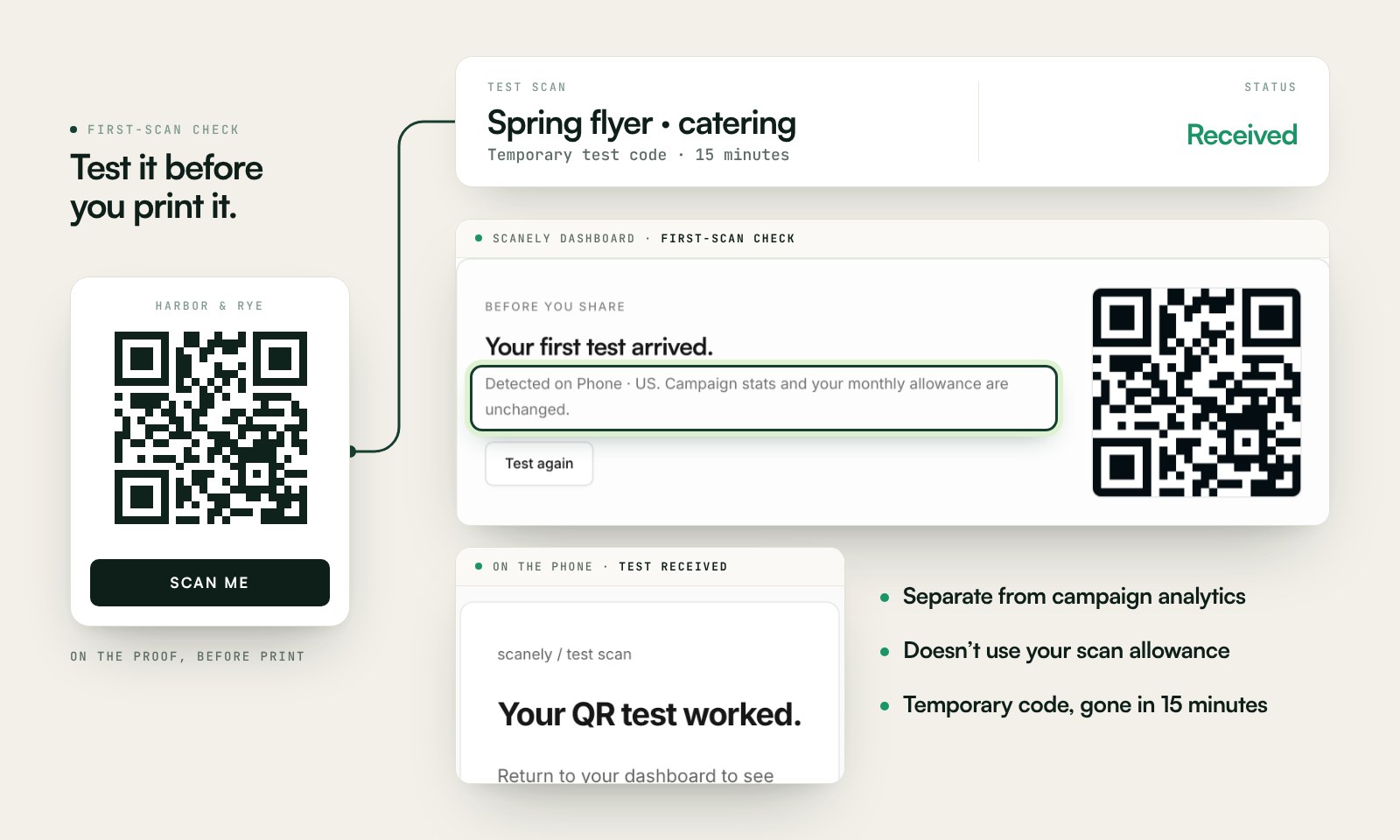
Scan a printed proof of your static download with a phone and check its destination. If you create a dynamic code in your Scanely account, First-scan check gives you a temporary test QR and confirms when your phone scans it.
The temporary code keeps test activity separate from campaign analytics. Never print it; download and test the final QR before ordering a batch.
Questions before you print
Is the image QR code free?
Yes. A QR from a photo or album link you already have is free: PNG and SVG downloads, the printable card, no account and no watermark. The free tool encodes the link in your browser; it does not upload, fetch or inspect the picture. Uploading an image to Scanely is a separate feature on monthly Starter, Pro and Business subscriptions.
Can the QR code contain the photo itself?
No. A QR code holds a few hundred characters of text, so it cannot hold a picture; it holds the link to one. "QR code with a photo inside" means a code printed next to or over a picture, and it still opens a link. Put the photo somewhere public, paste that link here, and the scan opens it.
Which photo links work?
Any public https link that opens a picture or an album: a Google Photos sharing link, a Google Drive file or folder shared with "Anyone with the link", a Dropbox or OneDrive sharing link, an iCloud shared album, Imgur, Flickr, Pinterest, Instagram, Unsplash, a Canva design in view mode, or a direct image file on your site. Editor links that only you can open are refused. WeTransfer links are accepted with a warning: they expire after a few days.
Can I upload the photo here instead?
Not in the free tool. With a monthly Starter, Pro or Business subscription you create a File / PDF code in the dashboard, upload a JPEG, PNG, WebP or GIF up to 20 MB, and the code opens the picture full-screen on the phone. You can replace the file later and keep the printed code, and the dashboard counts the scans. File hosting is not included in Free or Lifetime.
Can guests add their own photos?
Through a shared album, yes: create one in Google Photos, iCloud or Dropbox with uploads allowed, paste its link here and print the "Scan to see the photos" card for the tables. Scanely stores none of those photos; the album stays in your photo app. The wedding and party pages show the same card with an RSVP page behind it.
Can I change the picture after printing?
A static QR always contains the same link, so a printed code keeps opening the photo you pasted; if you delete it or change the sharing, the code opens nothing. For a code you can repoint later, create a dynamic QR in your Scanely account first and print that one: its destination stays editable after printing and it counts scans. The Free plan includes 3 dynamic codes; Starter is $9 per month for 50 and adds image hosting.
How big should the code be on a print, a frame or a gift tag?
At least 20 mm on anything read in the hand; the card in the print kit carries a 31 mm code and the sticker 38 mm. On a frame or a wall print read from a step away, 30 mm or more with the empty border. Longer links make denser codes, so a short sharing link or a dynamic short link scans more easily than a long Drive address. The QR size calculator gives the number for any distance.
Can I make a QR code for a Google Photos album?
Yes. In Google Photos open the album, choose Share, then Create link, and paste that link here. The code opens the album for anyone who scans it; turn off Collaborate in the album settings if guests should only view.