Free · No account needed
Open House Sign-In Sheet
Paste the link the code should open: the listing page with its sign-in form from your Scanely account, or any sign-in form you already use. Type the address, the hours and your details once, and download three print-ready PDFs that carry the same code: a ruled sign-in sheet for the entry table, a sign rider for the yard sign and a one-page flyer. Free, with no account needed for the PDFs.
Free forever. Your codes never expire.The listing page with its sign-in form from your Scanely account, a Google Form or the open house app of your CRM. Public and https.
Free static QR. No watermark, no scan limit, and no expiry set by Scanely. The destination must remain available.
Your QR code
Generated in your browser. Scanely does not upload your link to generate this static QR.
For the entry table, the yard sign and the hand-out
The open house kit, ready to print.
Type the address, the hours and your details once. The sign-in sheet, the sign rider and the flyer all carry the same code, your colour and your logo. Download each as a PDF and print at 100%.
PNG or JPEG up to 200 KB. It stays in your browser and is drawn into the PDFs only.
Add a valid link above to prepare your prints.
Each PDF prints at 100% / actual size. The sheet and the flyer go on plain paper or card; the rider goes to a sign shop as rigid board or vinyl. Scan the printed code once before the open house.
Sign-in sheet · Letter
Open house sign-in
24 Market Street
Sign in on your phone
Scan the code or write below
Name
Phone
Working with an agent?
By signing in you agree to be contacted about this property and similar homes. Your details stay with the listing agent.
At its real proportions. Your PDF uses Letter, 34 mm code.
Behind the code
The listing page with its own sign-in form.
The Open house template in your Scanely account is the page the code opens: the photo, the price, the address and the hours, three facts, buttons for the floor plan and a private showing, and a sign-in form that asks for the name, phone, email and whether the visitor works with an agent. Every sign-in lands in your email and in the dashboard, where you export the list after the weekend. Point a dynamic code at it and the same printed sheet, rider and flyer follow the listing until it sells.
- The Free plan includes three dynamic codes and 10 form sign-ins a month; Starter is $9 per month for 50 codes and 100 sign-ins, Pro takes 1,000.
- A dynamic code moves to the next listing after this one sells; a static code cannot.
- Scanely does not print or ship signs: it makes the code, the layouts and the page.
What a scan shows
Sample content: the Open house template. Dashboard > Pages > New page > Open house.
Keep the print. Change the link.
Create an account to make an editable QR and see scan counts. Your link, colors, and size will be ready in the creator.
A dynamic QR is a new code. Create and download it before printing; this static download will not become trackable.
What the sign-in sheet is for
An open house sign-in sheet is the list on the entry table: who came, how to reach them and whether they already have an agent. It is the follow-up list for the week after, the proof of traffic for the seller and, in many offices, the record the broker asks for. The sheet made here does the paper part and adds a code: visitors who would rather not hand over their phone number on a clipboard scan it and sign in on their own phone, and the entry arrives in your email and your dashboard. Both lists together are the real headcount.
This page makes the files. Scanely does not print or ship sign-in sheets, riders or flyers: you print the sheet and the flyer, and a sign shop prints the rider.
The columns, and why the agent question matters
Name, phone and email are on every sheet. The fourth column, "Working with an agent? Yes / No", is the one that saves you time: a visitor who already has an agent is not a lead, and following them up anyway is the fastest way to a complaint from that agent. The optional fifth column, "How did you hear about it?", tells you after a month of open houses whether the yard sign, the portal listing or the postcard brings people through the door. The consent line at the bottom says who keeps the details and what for; edit it to match what your brokerage says, and treat the paper sheet with the same care as the form behind the code.
The sign rider: sizes and where to print
A rider is the strip that hangs under the main yard sign. The usual size is 24 × 6 in for a 24 in frame; 18 × 6 in fits a narrower post and 12 × 6 in is a short strip with the code and the headline only. The maker prints the headline on your brand colour and the code as tall as the rider, 112 mm across, with the second line for your name and phone. Take the PDF to a sign shop and ask for corrugated plastic for one listing, aluminium composite for a rider you will reuse, or a vinyl decal to stick on the panel you already have. Short capitals read best: SCAN FOR PRICE & PHOTOS, OPEN HOUSE SAT 1 TO 4. The code reads from the sidewalk, one to two metres away; nobody scans from a moving car, so put the price and the hours in words too.
The flyer: one page to hand out
The flyer is the page visitors take home: the photo across the top, the address and the price, three facts such as beds, baths and size, a paragraph about the house and, at the bottom, you and the code. The photo is cropped to a wide 16:9 box in your browser and never leaves your computer; the logo sits above your name. Print on card for the entry table or on plain paper to leave in the kitchen, and the code opens the same page as the sheet, so a visitor who signs in at home still lands on your list.
Printing and setting up on the day
Print the sheet and the flyer at 100% or actual size, never fit to page. The sheet goes on a clipboard with two pens; a table tent next to it with the same code and the words "Sign in here" catches the people who walk past the clipboard. Tape the flyer to the door if the rider has not come back from the sign shop. Scan the printed code once with your own phone before the first visitor arrives, and keep the sheet with the day's date on it; the QR print templates page has a door sign and a window sticker for the rest of the house.
The code: size and distance
A code read from arm's length wants about 25 mm; the sheet uses 34 mm and the flyer 36 mm so that an older phone in a dim hallway still reads it. The rider's 112 mm covers the sidewalk. The check under the form confirms the module size for your link: a long link makes a denser code, a short one keeps it coarse. The QR size calculator gives the number for any other distance, and you can check the QR in your downloaded file before printing.
Static or dynamic, and after the open house
A static code carries the link itself. For one weekend that is fine; once the open house is over, the code on the rider still opens the same page. A dynamic code from your Scanely account opens a short link you can point anywhere later: at the listing page after the weekend, at a "sold, see similar homes" page once the sale closes, at your next listing when the rider moves to a new frame, and it counts scans per sign, so the rider on the corner lot and the flyer on the counter each have their number. The promise for printed codes says in writing what happens to a Scanely code. The Free plan includes three dynamic codes; Starter is $9 per month for 50 codes.
What goes behind the code
The Open house template in your Scanely account is the page the code opens: the listing with its photo, price, address and hours, three facts, buttons for the floor plan and a private showing, and a sign-in form that asks for the name, phone, email and the agent question, with a consent line of its own. Every sign-in emails you and appears in the dashboard, where you export the list. The Free plan takes 10 form sign-ins per calendar month across your pages, Starter 100, Pro 1,000 and Business has no limit. Any public form works too: a Google Form or the open house app of your CRM. For your own card at the door, the vCard QR generator makes a code that saves your contact to the visitor's phone. More placements for an agent, from the yard sign to the business card, are on the QR codes for real estate page.
Check the scan before your print run
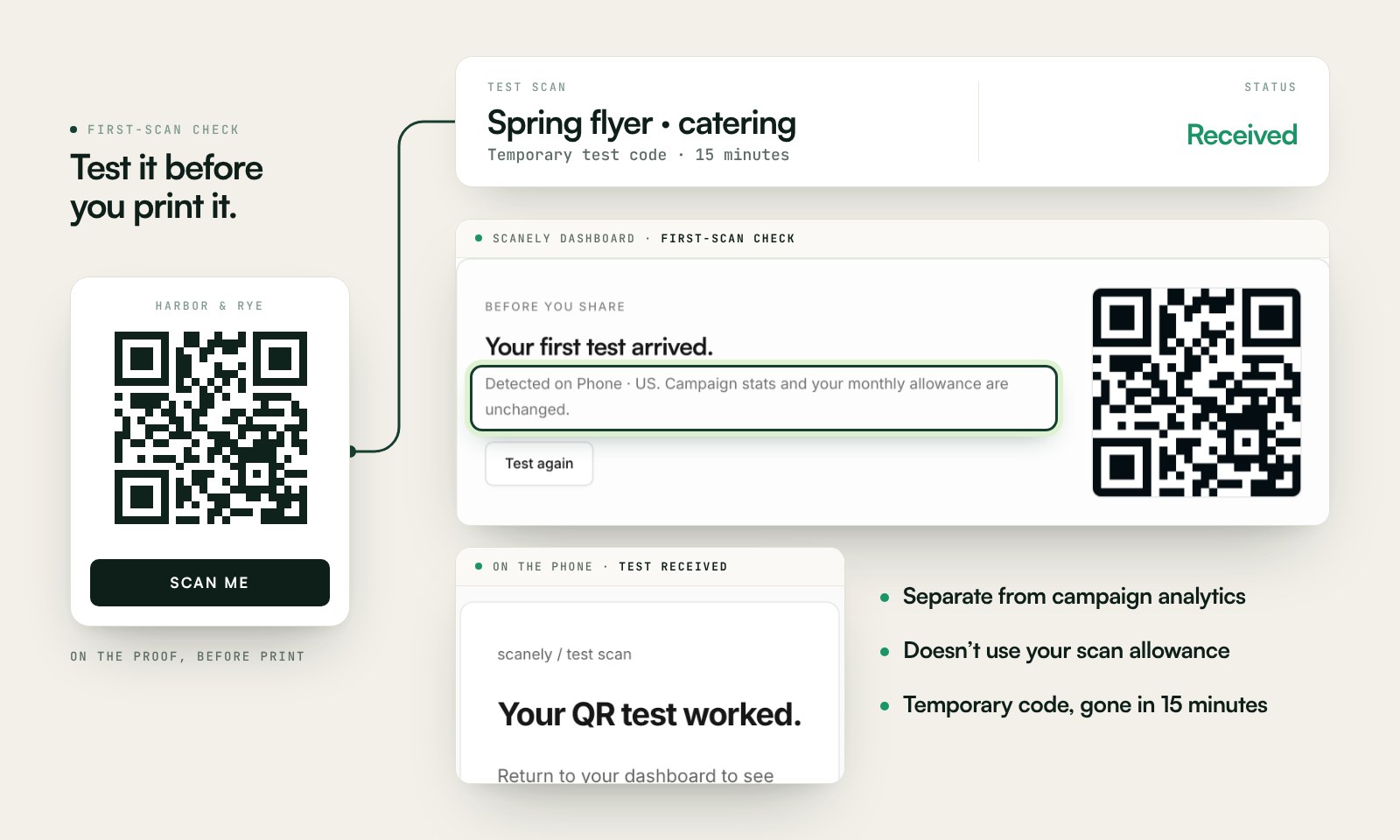
Scan a printed proof of your static download with a phone and check its destination. If you create a dynamic code in your Scanely account, First-scan check gives you a temporary test QR and confirms when your phone scans it.
The temporary code keeps test activity separate from campaign analytics. Never print it; download and test the final QR before ordering a batch.
Questions before you print
Is the open house sign-in sheet free?
Yes. The sign-in sheet, the sign rider and the flyer download as print-ready PDFs with no account, no watermark and no scan limit on a static code. Scanely does not print or ship anything: you print the sheet and the flyer on your own printer and take the rider PDF to a sign shop. The sign-in form behind the code is the one part that needs an account, and the Free plan includes it.
What does the QR code on the sheet do?
Visitors who would rather not write on paper scan the code and sign in on their own phone. With the Open house page from your Scanely account, each sign-in lands in your email and in your dashboard with the name, phone, email and the answer to "working with an agent", ready to export. The paper lines stay for everyone who prefers a pen, so nobody is turned away by a form.
Which columns should an open house sign-in sheet have?
Name, phone and email are the three every follow-up needs, so they are always on the sheet. "Working with an agent? Yes / No" tells you who is free to be represented and keeps you on the right side of other agents' clients. "How did you hear about it?" measures the yard sign against the portal listing and the postcard. A consent line at the bottom says who keeps the details and what for.
How many visitors fit on a page?
Sixteen lines on a Letter sheet and seventeen on A4, at 11 mm per line, which is enough room for an adult's handwriting. Choose up to five pages in one PDF for a busy weekend; every page repeats the header, the code and the page number, so the stack stays in order.
What size is a sign rider and where do I print it?
Riders hang under the main yard sign and come in 24 × 6 in for the standard 24 in frame, 18 × 6 in for a narrower post and 12 × 6 in as a short strip. Print the PDF at 100% at a sign shop on corrugated plastic, aluminium composite or as a vinyl decal; a home printer cannot do the size. The code is 112 mm across, which reads from one to two metres, that is from the sidewalk, not from a moving car.
Static or dynamic code for an open house?
A static code carries the link itself, which is fine for one weekend. A dynamic code from your Scanely account opens a short link you can point anywhere later: at the listing after the open house, at your next listing once this one sells, and it counts scans per sign so you know which placements worked. The Free plan includes three dynamic codes; Starter is $9 per month for 50.
What should the code open?
The Open house template in your Scanely account: the listing with its photos, price and hours, a sign-in form that emails you, and buttons for the floor plan and a private showing. The Free plan takes 10 form sign-ins per calendar month across your pages, Starter 100, Pro 1,000, Business without a limit. Any other sign-in form works too: a Google Form or the open house app of your CRM, as long as the link is public and https.