Free · No account needed
Coupon QR Code Generator
Paste the page for your offer. Download a QR for a flyer, receipt, or shelf tag. When the promotion ends, a dynamic code lets you change where the print goes.
Paste the page that states the discount and the end date. A code such as SAVE20 belongs on the text QR generator.
Free static QR. No watermark, no scan limit, and no expiry set by Scanely. The destination must remain available.
Your QR code
Generated in your browser. Scanely does not upload your link to generate this static QR.
Keep the print. Change the link.
Create an account to make an editable QR and see scan counts. Your link, colors, and size will be ready in the creator.
A dynamic QR is a new code. Create and download it before printing; this static download will not become trackable.
A coupon people can actually use
The useful coupon QR opens a page, not a mystery string. Put the discount, the products it covers, and the end date on that page. On the print, one line is enough: “Scan for 10% off.” A code that only displays SAVE20 is a text QR. Use it when the cashier needs to see the characters and you will not change them.
A menu special can live on the same site as the menu QR. A receipt opt-in that should open Messages belongs on the SMS QR generator. Packaging and shelf codes are covered in QR codes for retail.
Create a coupon page in Scanely Pages
Scanely does not have a separate coupon template. The closest start is the Offer template, “A little treat”: a promotion, the discount, a line for how long it lasts, and a form for a name and email. The sample says 20% off and “Valid through Sunday.” Replace that with your own offer and the real end date. Scanely hosts the page, so the QR can open it without a website. Form replies arrive in Leads. Edit the offer later and a dynamic code keeps the same print.
The end date lives on that page. This QR image cannot turn itself off on a calendar date. When the promotion ends, change the page, or point the code at a short note that the offer is over.
How to create a coupon QR code
- State the offer. Put the discount, what it covers, and the end date on a page. Start from the Scanely Offer template if you do not have a page yet.
- Paste the page link. Paste that page’s address. A bare code such as SAVE20 belongs on the text QR generator.
- Download and label the print. Download PNG or SVG. On the flyer, write what the scan does, then scan a proof. A dynamic Scanely code lets you change the offer after printing.
Create a coupon page from the Offer template. After you sign up, Scanely opens “A little treat” so you can replace the sample discount and end date.
Offers end. Static prints do not.
This download always opens the same address. Leave that page up after the sale and the print still promotes it. Take the page down and the code opens an error. A dynamic QR code keeps the printed image and lets you replace the destination: this week’s offer, then a thank-you page, then the next promotion. Free includes 3 dynamic codes and 1,000 scans a month. The codes keep redirecting after the allowance. Starter is $9/month for 50 codes and 100,000 scans.
Plans are on pricing. Size the code with the QR size calculator, and read how to write the line next to a QR.
Check the scan before your print run
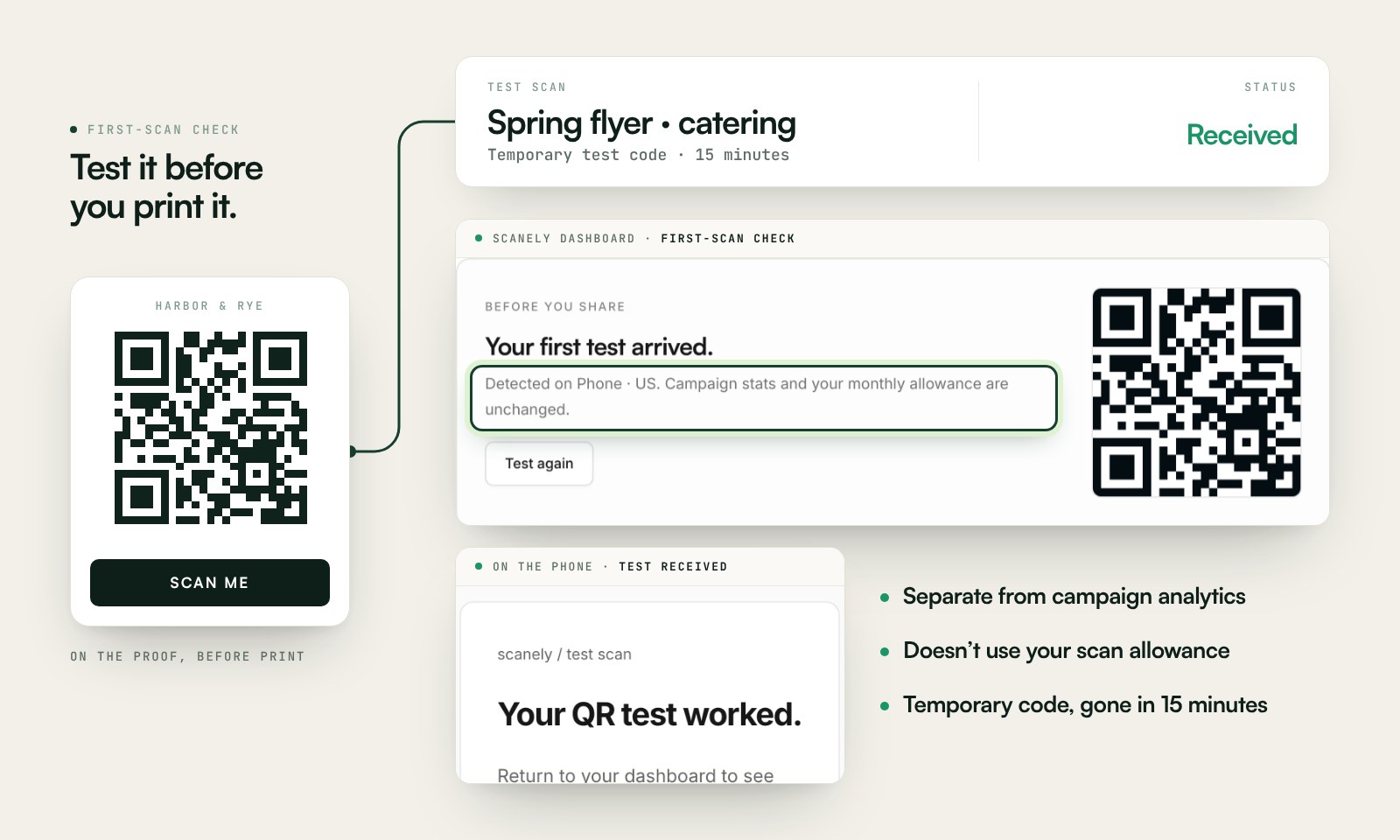
Scan a printed proof of your static download with a phone and check its destination. If you create a dynamic code in your Scanely account, First-scan check gives you a temporary test QR and confirms when your phone scans it.
The temporary code keeps test activity separate from campaign analytics. Never print it; download and test the final QR before ordering a batch.
Questions before you print
What should a coupon QR code open?
A page that states the offer: the discount, what it applies to, and when it ends. Paste that page’s address. A bare code such as SAVE20 is text, not a link. The text QR generator can display a code. This page opens a page.
Can I turn the offer off after the flyers are printed?
A static QR keeps the address you encoded. If that page stays up, the offer stays up. A dynamic Scanely code lets you point the same print at a new page, or at a short “offer ended” note, without reprinting. Free includes 3 dynamic codes, and they keep redirecting.
Can I see how many people scanned the coupon?
Not with the static download on this page. A dynamic code records scans, including city, device, browser, and time, within the plan allowance. The first 1,000 scans each month on Free include that detail.
Is this coupon QR code generator free?
Yes. PNG and SVG downloads need no account and add no watermark. The offer page is yours. Scanely does not host it unless you build the page in Scanely.
Where should the code sit on the piece?
Next to a short line that says what the scan does, such as “Scan for 10% off.” Use the QR size calculator for the distance, then scan a proof before the print run.
Can the QR expire on the offer’s end date?
No. The image does not store an end date, so a scanner cannot enforce one. Put the date on the offer page. When it passes, edit that page or point a dynamic Scanely code at a short “offer ended” note. The date is enforced on the page, not inside the code.
Can one code cover more than one offer?
A static code opens one address. A dynamic code can be updated when the promotion changes. A/B tests, for two destinations on one printed code, are on Pro, Business, and every Lifetime plan.