Free · No account needed
PayPal QR Code Generator
Paste a PayPal.me, payment, or donate link. We check the format, then you download a QR for a stall sign, invoice, or donation card. The payer still confirms the payment in PayPal.
Copy PayPal.me from your PayPal account. Sign-in and activity pages are rejected.
Free static QR. No watermark, no scan limit, and no expiry set by Scanely. The destination must remain available.
Your QR code
Generated in your browser. Scanely does not upload your link to generate this static QR.
Before someone pays
- 01. The right account. Read the PayPal.me name in the preview. This tool cannot see whether that account exists.
- 02. The amount. A trailing amount is fixed. Leave it off if the payer should choose.
- 03. A test payment. Scan a proof and complete a small payment before the sign is public.
Keep the print. Change the link.
Create an account to make an editable QR and see scan counts. Your link, colors, and size will be ready in the creator.
A dynamic QR is a new code. Create and download it before printing; this static download will not become trackable.
What this PayPal QR contains
The code stores a PayPal link, not a card number and not a PayPal login. Accepted links are paypal.me/yourname, the same link with an amount such as /25 or /25USD, a paypal.com/ncp/payment/… link, and a hosted donate link with hosted_button_id. Sign-in, activity, and invoice pages are rejected because a customer cannot use them.
PayPal’s app can also display a QR for your account. Use that when you are standing there with the phone. Use this generator when the code has to live on a market stall sign, a donation card, a menu, or an invoice PDF in colors that match the layout.
A stall sign, not a checkout
Write the reason next to the code: “Pay with PayPal,” “Suggested donation 10,” or “Deposit for the workshop.” If the amount is in the link, say that amount on the sign too, so the PayPal screen matches what people expect. Scanely does not process, hold, or refund the payment.
Static or dynamic?
This download is static. Changing the PayPal.me name, the suggested amount, or a retired payment link means a new image. That is the usual reason to use a dynamic QR for payments: the printed code stays on the sign, and you point it at a new PayPal link when the account or the amount changes. You also get scan counts, which are not the same thing as completed payments. Free includes 3 dynamic codes. Create the dynamic code and download it before printing. Paid plans start at $9/month when you need more than 3 codes.
Size the sign with the QR size calculator. For a map pin at the same stall, use the Google Maps QR generator or, if you only have an address, the location QR generator.
PayPal is a trademark of PayPal, Inc. Scanely is not affiliated with PayPal.
Check the scan before your print run
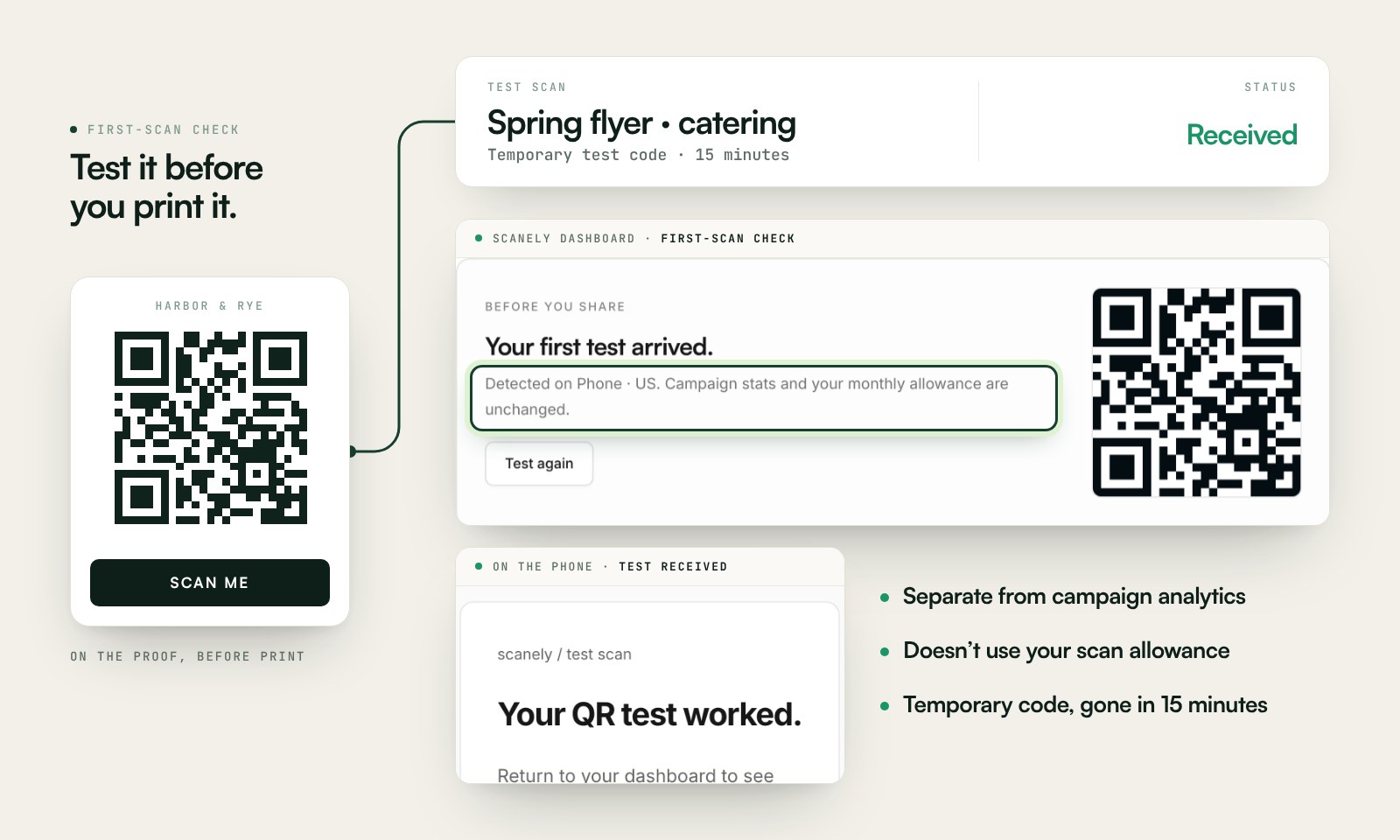
Scan a printed proof of your static download with a phone and check its destination. If you create a dynamic code in your Scanely account, First-scan check gives you a temporary test QR and confirms when your phone scans it.
The temporary code keeps test activity separate from campaign analytics. Never print it; download and test the final QR before ordering a batch.
Questions before you print
Is this PayPal QR code generator free?
Yes. Paste a PayPal.me, payment, or hosted donate link and download a static PNG or SVG. No account, watermark, or Scanely scan limit. The QR does not take the payment. The person still confirms it in PayPal.
Where do I find my PayPal.me link?
In PayPal, open PayPal.me and copy the link. It looks like paypal.me/yourname. An optional amount looks like paypal.me/yourname/25 or paypal.me/yourname/25USD. You can also paste a paypal.com/ncp/payment link or a donate link that includes hosted_button_id.
Is this the same as the QR in the PayPal app?
No. PayPal’s own app can show a personal QR tied to your account. This tool encodes a link you can drop into a sign, a menu, or a PDF, in colors you choose. It does not log into PayPal or confirm that the account exists.
What links are rejected?
PayPal sign-in, activity, invoice, and account pages are rejected because only you can open them. Legacy webscr button URLs are rejected too. Use PayPal.me, a payment link, or a hosted donate button.
Can I change the amount after printing?
Not on this static code. paypal.me/yourname/25 always asks for that amount. A new amount needs a new image. A dynamic Scanely QR can be pointed at a different PayPal link after printing, which matters if the suggested amount or the account changes.
How should I print it at a stall or on an invoice?
Keep the code dark on a light background, with a blank border. A counter sign scanned from about a metre away wants about 10 cm of code, using the size calculator’s 10:1 guide. An invoice held in the hand can be smaller. Write “Pay with PayPal” next to it so people know which app will open.