Free · No account needed
Google Maps QR Code Generator
Paste a place, directions, or maps.app.goo.gl link you copied from Google Maps. This page does not search for an address. For that, use the location QR generator.
In Google Maps, open the place, then Share → Copy link. An address with no link belongs on the location tool.
Free static QR. No watermark, no scan limit, and no expiry set by Scanely. The destination must remain available.
Your QR code
Generated in your browser. Scanely does not upload your link to generate this static QR.
Place link or typed address
- You have a Maps link. Paste it here. Short share links and place URLs both work.
- You have an address only. Use the location QR generator. It builds a search pin. It does not call a places API either.
- You want reviews. A Maps listing is not a review form. Use the Google review QR generator.
Keep the print. Change the link.
Create an account to make an editable QR and see scan counts. Your link, colors, and size will be ready in the creator.
A dynamic QR is a new code. Create and download it before printing; this static download will not become trackable.
A Maps link you already copied
This generator is for a URL from Google Maps: google.com/maps/place/…, a directions link under /maps/dir, or a short maps.app.goo.gl share link. In the Maps app or site, open the place, choose Share, then Copy link. Business Profile dashboard links and review links are rejected. Review codes belong on the Google review QR generator.
Nothing on this page searches Google. If you type a street address or latitude,longitude, use the location QR generator. That tool writes a Google Maps search for the text you enter. Use this page when you already trust a specific pin, saved place, or directions view.
What the scan opens
A short share link usually opens the place listing. The person taps Directions themselves. A /maps/dir link keeps the route that was on screen when you copied it, which is useful for “park in this lot, then walk here” and confusing if that route was only your own drive. Test the exact URL on a phone before a yard sign, a pop-up market poster, or a real estate board goes to print.
Static or dynamic?
The download is static. The Maps URL is inside the image, and Scanely does not count those scans. If the shop, venue, or parking pin might move, create a dynamic QR aimed at the Maps link and print the dynamic file. You can replace the destination later without reprinting. Free includes 3 dynamic codes. The static file from this page will not become editable after you download it.
Size the sign with the QR size calculator. A code people scan from the pavement needs to be larger than a card they hold.
Google Maps is a product of Google. Scanely is not affiliated with Google.
Check the scan before your print run
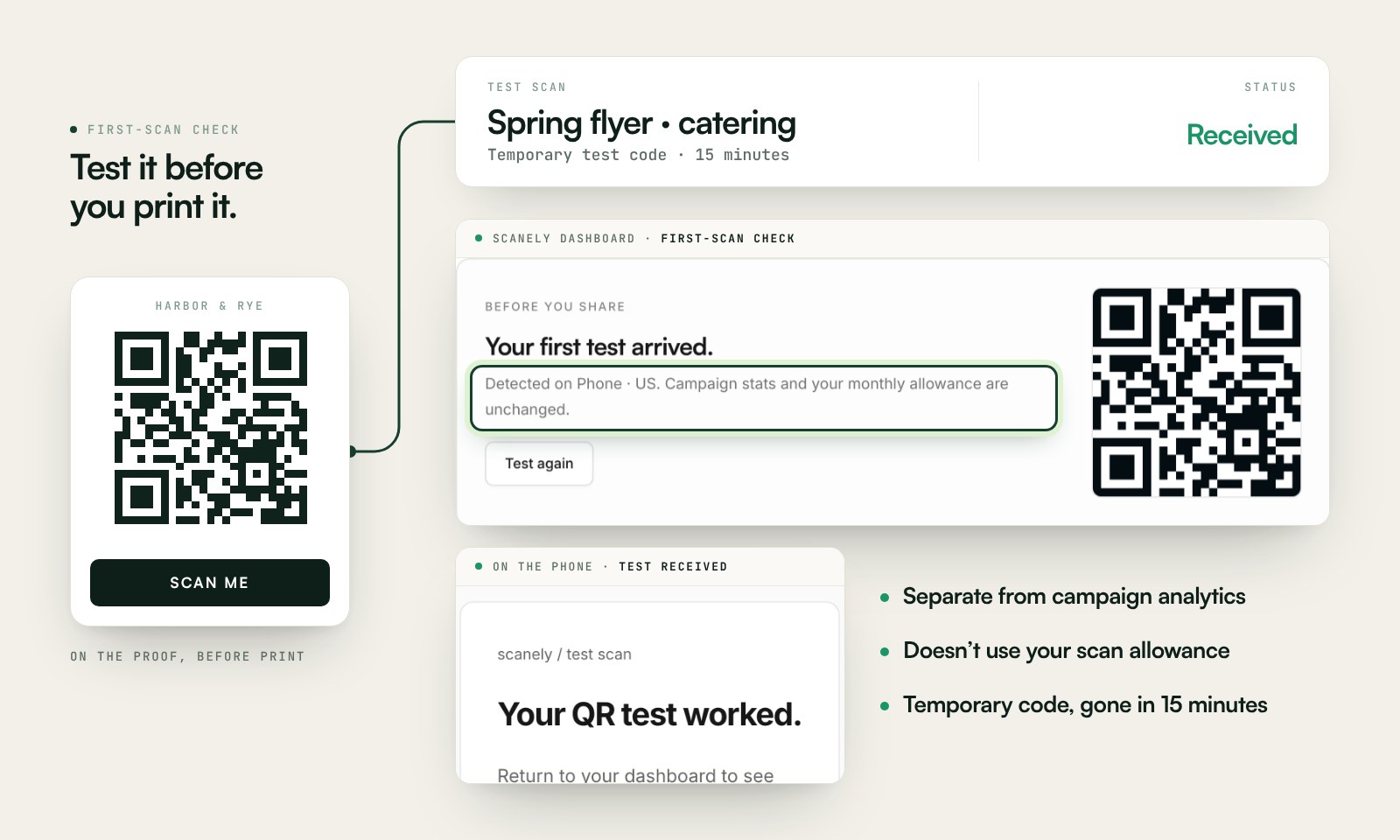
Scan a printed proof of your static download with a phone and check its destination. If you create a dynamic code in your Scanely account, First-scan check gives you a temporary test QR and confirms when your phone scans it.
The temporary code keeps test activity separate from campaign analytics. Never print it; download and test the final QR before ordering a batch.
Questions before you print
How is this different from the location QR generator?
This page encodes a link you already copied from Google Maps: a place, a directions link, or a maps.app.goo.gl share link. The location QR generator is for when you have an address or coordinates and no Maps link. It builds a Google Maps search from what you type. This page does not look up places.
Where do I copy a Google Maps link?
Search for the place in Google Maps, open it, choose Share, then Copy link. You can also copy the address bar when it shows google.com/maps/place/…. Do not copy a Business Profile dashboard link.
Will a short maps.app.goo.gl link open directions?
Usually it opens the place listing, and the person taps Directions there. It does not encode a route of your choosing. If you copied a google.com/maps/dir link, the QR keeps that directions address, including the route that was on screen.
Can I type an address here?
No. An address or a latitude,longitude pair belongs on the location QR generator. Pasting it here will not search Google for a place.
Is the Google Maps QR code generator free?
Yes. The download is a static PNG or SVG. No account, watermark, or Scanely scan limit. Scanely does not set an expiry. The place still has to exist at that Google link.
What if the shop moves?
A static QR keeps the old Maps link. Create a dynamic Scanely QR before printing if you may point the same sign at a new pin later and want to count scans.