Free · No account needed
LinkedIn QR Code Generator
Paste a public profile or company page. We reject feed, messaging, and lnkd.in short links, then you download a QR for a business card or one-pager.
Use the public profile URL from Contact info. lnkd.in short links are not accepted.
Free static QR. No watermark, no scan limit, and no expiry set by Scanely. The destination must remain available.
Your QR code
Generated in your browser. Scanely does not upload your link to generate this static QR.
Before it goes on a card
- 01. Public URL. Copy linkedin.com/in/… from Contact info, not an lnkd.in share.
- 02. Private window. Confirm a stranger can see the profile or company page.
- 03. Card size. Leave a blank border. A long slug needs more than a tiny square.
Keep the print. Change the link.
Create an account to make an editable QR and see scan counts. Your link, colors, and size will be ready in the creator.
A dynamic QR is a new code. Create and download it before printing; this static download will not become trackable.
The link that belongs on a card
On your profile, open Contact info and copy the public profile URL. Company pages use linkedin.com/company/yourcompany. School and showcase pages are accepted too. Feed, messaging, jobs, and lnkd.in short links are rejected: a stranger with a printed card should land on a page you can name, not a login interstitial.
Business cards and one-pagers
Put the code on the back of a card with a line such as “Connect on LinkedIn,” and leave the front for your name. A recruiting one-pager can open the company page instead of a personal profile. Pair the code with a vCard QR when you also want the phone to save your contact. The business card use case covers both.
Long profile slugs make denser codes. On a standard card, give the QR a clear quiet zone and check it with the size calculator. Scanning from about 20 cm wants roughly 2 cm of code, and card stock that is dark or glossy needs more contrast than a screen preview.
Static or dynamic?
This download stores the LinkedIn address in the image. It does not count scans, and editing your headline on LinkedIn does not require a new code. Changing the public URL does. If you expect a new slug, a new role, or a later switch from your profile to the company page, make a dynamic QR first and print that file. A dynamic code can also use a shorter Scanely address, which stays easier to scan when the LinkedIn slug is long. Free includes 3 dynamic codes. Create a free account when you are ready to print the editable version.
Scanely is independent of LinkedIn.
Check the scan before your print run
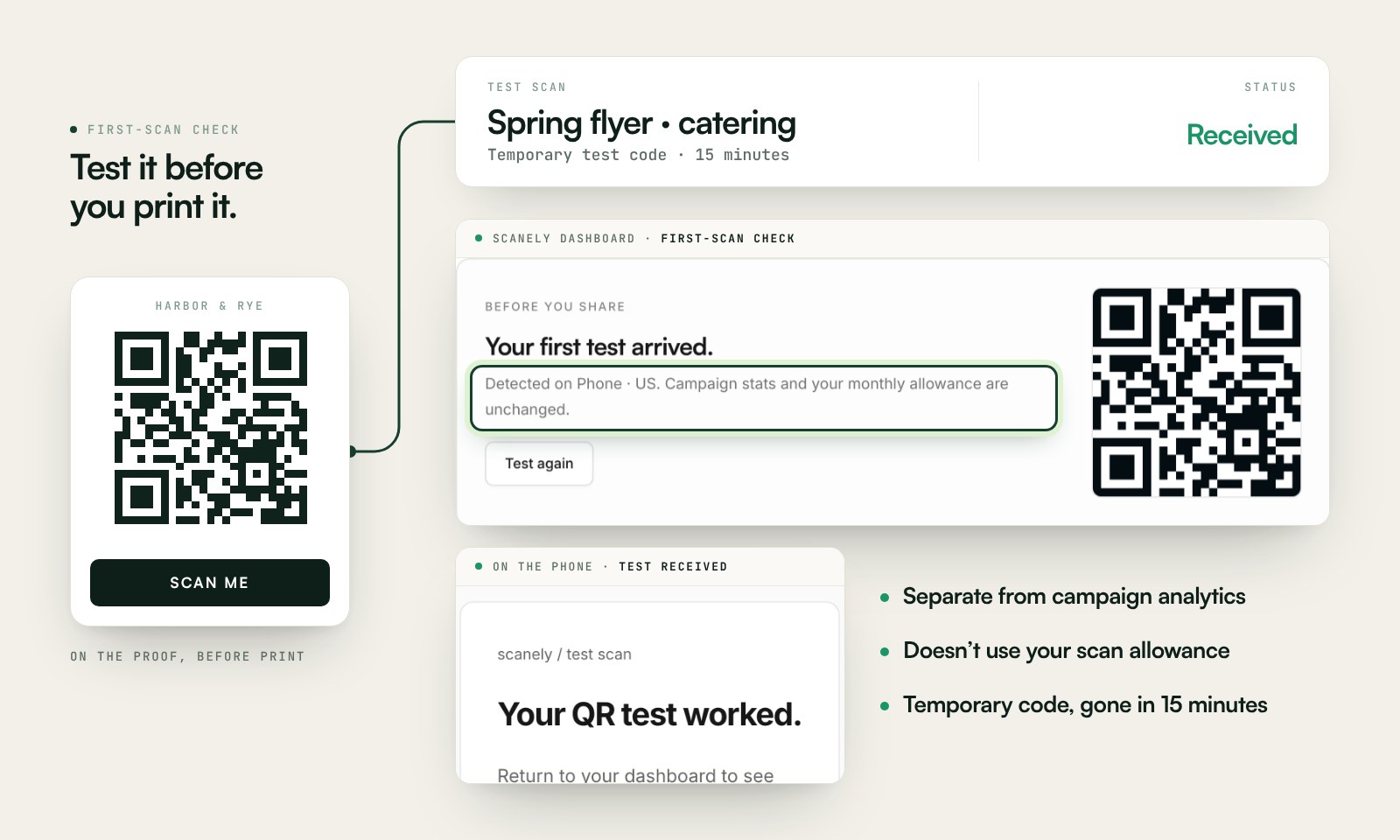
Scan a printed proof of your static download with a phone and check its destination. If you create a dynamic code in your Scanely account, First-scan check gives you a temporary test QR and confirms when your phone scans it.
The temporary code keeps test activity separate from campaign analytics. Never print it; download and test the final QR before ordering a batch.
Questions before you print
Is this LinkedIn QR code generator free?
Yes. Download a static QR for a public profile or company page as PNG or SVG. No account, watermark, or Scanely scan limit.
Where do I copy my LinkedIn URL?
Open your profile, choose Contact info, and copy the public profile URL. It looks like linkedin.com/in/yourname. For a company, open the company page and copy the address bar. Skip the LinkedIn mobile share sheet when it offers an lnkd.in short link.
Can I put a LinkedIn QR on a business card?
Yes. Leave a blank border and keep the code large enough to scan at arm’s length. A long /in/ slug makes a denser code, so give it more of the card than a tiny icon. The size calculator’s 10:1 guide is the check: scanning from about 20 cm wants a code about 2 cm across, and a little larger is safer on textured card stock.
Why are lnkd.in links rejected?
Those short links often open a login wall or a tracking redirect. A printed card should use the public linkedin.com/in or linkedin.com/company address, which you can read and test.
What if my public URL changes?
A static QR keeps the old address. Customizing your public profile URL later does not update cards you already printed. A dynamic Scanely QR lets you point the same printed code at the new profile and count scans. Create and download the dynamic code before printing.
Does the QR connect people automatically?
No. It opens the profile or company page. The person still chooses Follow or Connect. Test the page in a private window, because some profiles are limited to signed-in members.